

You are using an out of date browser. It may not display this or other websites correctly.
You should upgrade or use an alternative browser.
You should upgrade or use an alternative browser.
SeniorForums on your Smart TV
- Thread starter 1955
- Start date

hollydolly
SF VIP
- Location
- London England
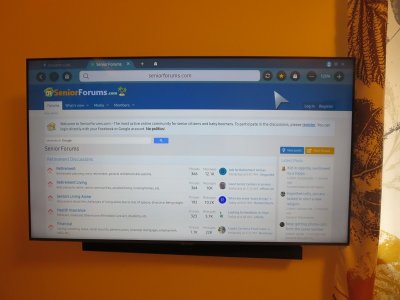
that would scare the heck outta ya wouldn't it ?Just for fun I tried using my TV internet browser to bring up the forum & it works just fine. Although you can navigate using the remote it works much better with a keyboard that most TV’s will support.
View attachment 256062
 ...just joking.. ! However my TV is far too far away from my sofa to be able to hook up to it with a keyboard
hawkdon
Well-known Member
- Location
- Liberty MO
Reminds me when I had the web tv set up.....almost wish
that was still available.....my tv is the dumb variety....
that was still available.....my tv is the dumb variety....

SeniorBen
Senior Member
Is that the Firefox browser? Last time I checked, that was the only browser available for Roku, which is what I use instead of a Smart TV. Of course, I haven't checked to see if there are any new browsers available in a couple years so there may be some new ones.Just for fun I tried using my TV internet browser to bring up the forum & it works just fine. Although you can navigate using the remote it works much better with a keyboard that most TV’s will support.
View attachment 256062
Sometimes there are interviews on C-SPAN or other channels that can't be accessed on YouTube, but if there was a working browser, that would be an option.

1955
Member
This is just a stand alone Smart TV. Plug a Ethernet cable in the back or connect to your WiFi & you can stream from all the services, access YouTube, browse the Internet, plus much more. No external hardware or software needed. The TV in the picture is a 55" Samsung UN55TU7000 I bought from WalMart for $398.Is that the Firefox browser? Last time I checked, that was the only browser available for Roku, which is what I use instead of a Smart TV. Of course, I haven't checked to see if there are any new browsers available in a couple years so there may be some new ones.
Yeah, it's a cheap model but it works well & has great access to all the services & Internet.
1955
Member
You can get a cheap wireless keyboard for $19.95 (Logitech K400). They come with a USB dongle you plug into the TV. This TV is in my bedroom and at 55" it's no problem to read the browser.However my TV is far too far away from my sofa to be able to hook up to it with a keyboard

Bellbird
-Oceania-South Pacific
- Location
- New Zealand
I wouldn't be without a Smart TV now, so much to pick and choose from.This is just a stand alone Smart TV. Plug a Ethernet cable in the back or connect to your WiFi & you can stream from all the services, access YouTube, browse the Internet, plus much more. No external hardware or software needed. The TV in the picture is a 55" Samsung UN55TU7000 I bought from WalMart for $398.
Yeah, it's a cheap model but it works well & has great access to all the services & Internet.
1955
Member
Not very convenient. I like just the one remote. Although I have a keyboard for the TV 99% of the time the remoted gets the job done. Although you can use the remote to enter text, anything that requires more than a word or two I grab the keyboard.I did a bit of research and instead of running a browser in your TV, most people just "cast" from their smartphones to their Smart TV or Roku box (or equivalent). There are a few browsers available for Roku but they seem to be lacking in certain capabilities.
SeniorBen
Senior Member
Your smart TV has a keyboard?Not very convenient. I like just the one remote. Although I have a keyboard for the TV 99% of the time the remoted gets the job done. Although you can use the remote to enter text, anything that requires more than a word or two I grab the keyboard.
1955
Member
Most of the newer TV's will work with a keyboard/mouse. As mentioned above I use a wireless Logitech K400 which is a keyboard & touchpad.Your smart TV has a keyboard?