Cannot post file; exceeds limits

MACKTEXAS

Well-known Member
Could someone please tell me how I can stop getting this message when trying to post a PNG file? It started out bigger than 500 pixels, but even after I reduced it to half, it still exceeds the limit. Thanks!

oopsjpeg.jpg

P.S. The above file is a jpeg, but I copied the pop up when trying to post a PNG.
 

Could someone please tell me how I can stop getting this message when trying to post a PNG file? It started out bigger than 500 pixels, but even after I reduced it to half, it still exceeds the limit. Thanks!

View attachment 463250

P.S. The above file is a jpeg, but I copied the pop up when trying to post a PNG.
I have had that problem many times. Sometimes I change it from a PNG to a JPEG.
 

Could someone please tell me how I can stop getting this message when trying to post a PNG file? It started out bigger than 500 pixels, but even after I reduced it to half, it still exceeds the limit. Thanks!

View attachment 463250

P.S. The above file is a jpeg, but I copied the pop up when trying to post a PNG.
SF doesn't seem to like PNG files. If you convert it to a JPG it should be fine.
 
Ok, no more PNG files for me. On some sites, when I choose save as, the only option offered by the image host is PNG. The workaround will be to copy the image, paste to a text document, from where I can save it as a JPEG.
 
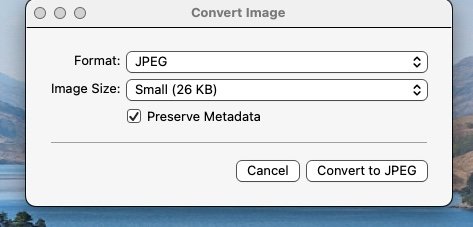
This is for Mac but I am sure Windows has similar

You can convert png files by right click on image, choose quick actions, convert image,
which brings up this little screen.

View attachment 467942
Using your idea (I have Windows) I opened an existing PNG with paint, then chose FILE, then chose SAVE AS, then chose JPEG and saved it and it worked fine. So thanks for your help - it was easier than what I had been doing.:)
 
Using your idea (I have Windows) I opened an existing PNG with paint, then chose FILE, then chose SAVE AS, then chose JPEG and saved it and it worked fine. So thanks for your help - it was easier than what I had been doing.:)
Good... and I can do that too with files already saved in my system.
I use this method for files which I swipe from the net on to desktop.
Convert , then delete after posting or save if I want to keep.
That way they don't get into my system
 
Using your idea (I have Windows) I opened an existing PNG with paint, then chose FILE, then chose SAVE AS, then chose JPEG and saved it and it worked fine. So thanks for your help - it was easier than what I had been doing.:)
You can also save to a different format with Windows' default image viewer.


Back
Top