Is this a good place to find computer advice?

Sunkist

Member
The day before yesterday, I needed to find email address for a local businessperson.. made the mistake of thinking zoominfo was legitimate, second mistake was trying to download it.. it took Microsoft's whatever-it's-called til yesterday to notify me the .exe was a hacker... I tried to uninstall it, but it would not uninstall..

Disconnected the PC, connected laptop.. ran around changing passwords..
The only whatever-it's-called that presumably scans for AND removes this kind of threat was Norton. Purchased Norton, but can't figure out how to use it, and/or if it's even effective.

WILL it clean all the dangerous stuff out of my devices? and, if so, HOW to install it- I have the infected PC, this laptop I'm currently using, and another PC that isn't working but need to get it fixed.. the Norton I purchased is supposed to be good for multiple devices..
I don't know what the heck I'm doing anyway, but top concern is the confirmation and download link is in my email.. I wouldn't even know how to open my email without hacker being able to access it.

I never use wifi. Is it possible this exe/hacker could have accessed my modem/router???

I don't have a usb to do anything without connecting to the internet, and can only have one device connected at a time.


Hopefully there's someone here that has a lot of tech knowledge and can advise.
 

I've seen some pretty good computer advice on here.
The first thing you might want to try is Malware Bytes, it's free and it will do a pretty thorough scan of your PC looking for all sorts of nefarious files. You can download it here: Official Site | Malwarebytes: Antivirus, Anti-Malware & Privacy
Norton is okay, and there's plenty of free programs that are robust enough to protect you. I looked at PC World magazine and they rate in order:
1 Bitdefender
2 Norton
3 McAfee
4 G Data Antivirus
5 Malware Bytes

If you already purchased Norton (#2) that will give you lots of protection. If you're not sure how to use it try looking at YouTube for a tutorial. Here's a link to a YouTube page with several Norton tutorials: https://www.youtube.com/results?search_query=how+to+use+norton+antivirus
I'd offer to help but since I don't use Norton I might not be of much use.

Start by downloading and running Malware bytes first, if you picked up a virus or a root kit or a boot Kit it will detect and remove them.

How to make sure Malwarebytes actually scans for rootkits
Malwarebytes does not enable rootkit scanning by default (because it makes scans slower). Best suggestion here is to run a regular scan and then do a rootkit scan afterwards.
To turn it on:
  1. Open Malwarebytes
  2. Click the Gear icon
  3. Go to Security
  4. Enable Scan for rootkits
  5. Run a Threat Scan
I hope this helps.
 
I've seen some pretty good computer advice on here.
The first thing you might want to try is Malware Bytes, it's free and it will do a pretty thorough scan of your PC looking for all sorts of nefarious files. You can download it here: Official Site | Malwarebytes: Antivirus, Anti-Malware & Privacy
Norton is okay, and there's plenty of free programs that are robust enough to protect you. I looked at PC World magazine and they rate in order:
1 Bitdefender
2 Norton
3 McAfee
4 G Data Antivirus
5 Malware Bytes

If you already purchased Norton (#2) that will give you lots of protection. If you're not sure how to use it try looking at YouTube for a tutorial. Here's a link to a YouTube page with several Norton tutorials: https://www.youtube.com/results?search_query=how+to+use+norton+antivirus
I'd offer to help but since I don't use Norton I might not be of much use.

Start by downloading and running Malware bytes first, if you picked up a virus or a root kit or a boot Kit it will detect and remove them.

How to make sure Malwarebytes actually scans for rootkits
Malwarebytes does not enable rootkit scanning by default (because it makes scans slower). Best suggestion here is to run a regular scan and then do a rootkit scan afterwards.
To turn it on:
  1. Open Malwarebytes
  2. Click the Gear icon
  3. Go to Security
  4. Enable Scan for rootkits
  5. Run a Threat Scan
I hope this helps.
Thank you!!!! I'll need to come back to this tomorrow when I've been able to get a little sleep, am totally wiped out..

Before I chose Norton, I checked Bitdefender, but it appeared that it does not actually remove this stuff.
I considered and/or tried various others before this even occurred, most seemed to have one thing in common: scanning and/or detecting threats, but not removing them without buying an additional program/software.

I've been using CCleaner for a few years, that didn't even pick up on the threat.

I've also used MalwareBytes for quite a few years, but this is the second time something like this has happened without M.B. detecting it. The other instance was a different PC, a few years ago.
 

I've seen some pretty good computer advice on here.
The first thing you might want to try is Malware Bytes, it's free and it will do a pretty thorough scan of your PC looking for all sorts of nefarious files. You can download it here: Official Site | Malwarebytes: Antivirus, Anti-Malware & Privacy
Norton is okay, and there's plenty of free programs that are robust enough to protect you. I looked at PC World magazine and they rate in order:
1 Bitdefender
2 Norton
3 McAfee
4 G Data Antivirus
5 Malware Bytes

If you already purchased Norton (#2) that will give you lots of protection. If you're not sure how to use it try looking at YouTube for a tutorial. Here's a link to a YouTube page with several Norton tutorials: https://www.youtube.com/results?search_query=how+to+use+norton+antivirus
I'd offer to help but since I don't use Norton I might not be of much use.

Start by downloading and running Malware bytes first, if you picked up a virus or a root kit or a boot Kit it will detect and remove them.

How to make sure Malwarebytes actually scans for rootkits
Malwarebytes does not enable rootkit scanning by default (because it makes scans slower). Best suggestion here is to run a regular scan and then do a rootkit scan afterwards.
To turn it on:
  1. Open Malwarebytes
  2. Click the Gear icon
  3. Go to Security
  4. Enable Scan for rootkits
  5. Run a Threat Scan
I hope this helps.
Ok, I followed these instructions re: MalwareBytes. It said no threats detected.

I went to the Microsoft security page, and it said threat was removed Jan. 6.
However- the programs & apps list still lists the Zoominfo Contributer something.. wouldn't that mean it's still on/in the PC???
I tried the uninstall again, twice, and it continued to say the uninstall can't be found..
 
Have you contacted Norton and asked them to fix it.
You might as well get your moneys worth. You paid money for that Norton
I'm not sure how to contact them, but the confirmation software is in my email, and I'd be afraid to log into email if the hacker/threat is still present.
 
Are you running Windoze 11?

Check the following: Settings > Apps > Installed apps? Look for any unfamiliar app that is installed and uninstall it from there.
If the file you downloaded installed any application it will be listed there.
 
Are you running Windoze 11?

Check the following: Settings > Apps > Installed apps? Look for any unfamiliar app that is installed and uninstall it from there.
If the file you downloaded installed any application it will be listed there.
The PC (not this one) is Windows 11.. however, it still says the app is still there, even though MalwareBytes says none and Windows security says it was removed.. I don't think it'd be in the list if it were not still present
 
The PC (not this one) is Windows 11.. however, it still says the app is still there, even though MalwareBytes says none and Windows security says it was removed.. I don't think it'd be in the list if it were not still present
Wouldn't hurt to take a look, any app installed will be listed there.
If there is something that does not look right, I'd uninstall it to be on the safe side
 
Wouldn't hurt to take a look, any app installed will be listed there.
If there is something that does not look right, I'd uninstall it to be on the safe side
That's the problem- it says uninstaller cannot be found, and the app is still on the list as being present..
 
I'm not sure how to contact them, but the confirmation software is in my email, and I'd be afraid to log into email if the hacker/threat is still present.
I googled you a number. 1-833-766-7866. Hopefully they can walk you thru setting up your account and fixing the problem on the phone. Dont be hesitant to contact them. What the use of paying for their service if youre not going to use it.

First let me say I know just enuf about my computer to be dangerous. So its not wise for me to mess with the innards of my computer.
I have Eset for my security. If I have an issue I log into my account and open chat. I give them remote access. I get a onetime code to give permission. I can see every move of the cursor on my screen. After logout they no longer have any access.
Personally I prefer chat over calling. They go too fast. With chat you can take your time and you have an online record of the conversation.

Norton Software | Norton Products and Services
 
I found a program called Revo.. had to connect to internet to download it.. supposedly removes all traces of the .exe app, it's no longer on apps list.. hopefully it worked..

Went into email, grabbed Norton, installed and ran it..
then changed email password..

Do you guys think these steps did everything that needed to be done so the PC is ok again?
 
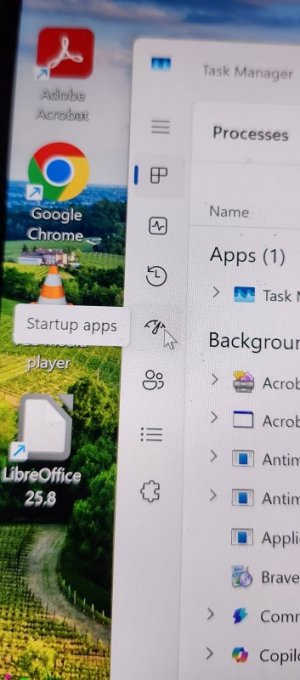
I would also take a look at your start up to see if it snuck anything in there that would start up when you turn your computer on.

Right click on the task bar / Task Manager / there are icons on the left, the one that looks like a meter. Click on that one.
Just look at the apps that run on startup and if you see something out of the ordinary, disable it.
1000016082.jpg
 
I would also take a look at your start up to see if it snuck anything in there that would start up when you turn your computer on.

Right click on the task bar / Task Manager / there are icons on the left, the one that looks like a meter. Click on that one.
Just look at the apps that run on startup and if you see something out of the ordinary, disable it.
View attachment 479252
Thanks! I will do that when I start up the regular PC the next time
 
If Norton and Malwarebytes both report that the threat is gone, it’s very likely removed. Windows sometimes leaves behind leftover entries even after something is uninstalled.
If you’re comfortable working in the Registry Editor, you can check for traces manually.
  1. Open the Start menu and type regedit.
  2. Open Registry Editor.
  3. Press Ctrl+F to open the Find dialog.
  4. Type the name of the program you want to check for.
  5. If a matching entry is found, confirm it’s actually related to that program, then delete it if appropriate.
  6. Press F3 to continue searching for the next match.
Be careful not to delete anything unrelated, since the registry controls core Windows functions.
 
If Norton and Malwarebytes both report that the threat is gone, it’s very likely removed. Windows sometimes leaves behind leftover entries even after something is uninstalled.
If you’re comfortable working in the Registry Editor, you can check for traces manually.
  1. Open the Start menu and type regedit.
  2. Open Registry Editor.
  3. Press Ctrl+F to open the Find dialog.
  4. Type the name of the program you want to check for.
  5. If a matching entry is found, confirm it’s actually related to that program, then delete it if appropriate.
  6. Press F3 to continue searching for the next match.
Be careful not to delete anything unrelated, since the registry controls core Windows functions.
Thanks for this info! Even after Revo and Norton, when I used this suggestion it came up again.. NOW it's gone permanently, right? (AND changed all PW's I'd used, too..)
 
If you cleared o
Thanks for this info! Even after Revo and Norton, when I used this suggestion it came up again.. NOW it's gone permanently, right? (AND changed all PW's I'd used, too..)
If you cleaned out all references to it in the registry I would think it has to be gone or disabled. When you say it came up again, where does it show up?
 
If you cleared o

If you cleaned out all references to it in the registry I would think it has to be gone or disabled. When you say it came up again, where does it show up?
Going by your instructions in previous post.. Registry list.
No idea why neither Revo nor Norton dealt with it.
But it's not there now.


Back
Top