

I'm Loving My New Roku Ultra Streaming Device

OneEyedDiva

SF VIP
Location
New Jersey
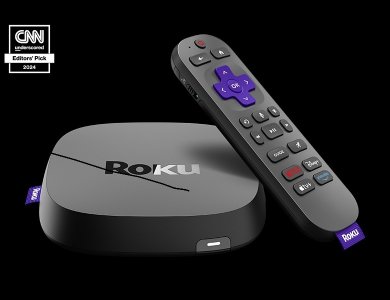
The Roku Ultra touts the following features:
~Their fastest streaming player ever
~Unmatched cinematic picture and sound

~Voice activated, backlit remote with rechargeable battery (using USB cable)
~Access to favorite shows, plus free and trending content

An unexpected benefit… the remote shuts the T.V. off if I haven’t watched something in a while. Not sure how many minutes yet. That can be a money saver because I fall asleep with the T.V. on, sometimes for hours and HDTVs pull a lot of electricity. It also has instant access buttons for Disney+, Netflix, Apple TV. Prime and the channel guide. One of my favorite features is that I can listen with my Bluetooth headphones while watching T.V. This comes in particularly handy after my son goes to bed, usually between 8 and 9 on work days.

The unit is easy to set up, but I did have to sign into my Roku and other streaming service accounts again. I noticed better picture quality immediately. The device sells for $99.99 plus tax on the Roku website. I got it for $77.93 including tax on Amazon, considering my reward points. Plus I’ll get an additional 5% cashback on the final purchase price.
ultra-pdp-carousel_cnn-badge_780x600.jpg
 
Interesting that you said better picture quality. I have an older tv (almost 14 years). Maybe this will help. Plus I rubbed all the print off my old Roku remote. Maybe it's time for my cheap butt to buy a new Roku device.
 
I use a Roku device on my 2002 Panasonic plasma TV and it works woderfully. I have always had very poor TV reception here using an antenna but have refused to pay for cable, the Roku device opened me up to a large selection of shows plus gives me great picture quality, all for a one time cost of around $40.
 
Netflix freezes sometimes on my "smart" TV. I still have my old Roku box, so I revert back to that when Netflix won't play a movie, which is fairly often. Sometimes, Netflix wouldn't work on the Roku device, but rebooting it would always work to fix the problem. There's no way to "reboot" the SmartTV. Turning it off and turning it back on doesn't work. Maybe I need to reinstall the app.
 
The Roku Ultra touts the following features:
~Their fastest streaming player ever
~Unmatched cinematic picture and sound

~Voice activated, backlit remote with rechargeable battery (using USB cable)
~Access to favorite shows, plus free and trending content

An unexpected benefit… the remote shuts the T.V. off if I haven’t watched something in a while. Not sure how many minutes yet. That can be a money saver because I fall asleep with the T.V. on, sometimes for hours and HDTVs pull a lot of electricity. It also has instant access buttons for Disney+, Netflix, Apple TV. Prime and the channel guide. One of my favorite features is that I can listen with my Bluetooth headphones while watching T.V. This comes in particularly handy after my son goes to bed, usually between 8 and 9 on work days.

The unit is easy to set up, but I did have to sign into my Roku and other streaming service accounts again. I noticed better picture quality immediately. The device sells for $99.99 plus tax on the Roku website. I got it for $77.93 including tax on Amazon, considering my reward points. Plus I’ll get an additional 5% cashback on the final purchase price.

View attachment 502361
Welcome to my world!!!!
 
Netflix freezes sometimes on my "smart" TV. I still have my old Roku box, so I revert back to that when Netflix won't play a movie, which is fairly often. Sometimes, Netflix wouldn't work on the Roku device, but rebooting it would always work to fix the problem. There's no way to "reboot" the SmartTV. Turning it off and turning it back on doesn't work. Maybe I need to reinstall the app.
This is why I bought the Roku. Even though my smart TV is newer it would have conniption fits after a while and I'd have to clear the cache on everything. When the TV froze, I had to unplug the power to get it up and running again.

With the Roku, I no longer have as many problems. I don't have Netflix. I tried it and found I didn't care for it so cancelled.
 
This is why I bought the Roku. Even though my smart TV is newer it would have conniption fits after a while and I'd have to clear the cache on everything. When the TV froze, I had to unplug the power to get it up and running again.

With the Roku, I no longer have as many problems. I don't have Netflix. I tried it and found I didn't care for it so cancelled.
Yeah, my wife likes to watch some series on Netflix, so we have to keep it. I'd cancel in a second if it was up to me.
 
Interesting that you said better picture quality. I have an older tv (almost 14 years). Maybe this will help. Plus I rubbed all the print off my old Roku remote. Maybe it's time for my cheap butt to buy a new Roku device.
Go for it OE !! Treat yourself...you deserve it. I'm glad I decided to upgrade. My catalyst was that the one I had started acting up. But of course as soon as it "heard" me say I was going to get another one, it started acting right. :ROFLMAO: But I had already decided to get a new one. BTW, my TV. a Panasonic HD, is at least as old as yours if not older.
Welcome to my world!!!!
Dusty, this is my third Roku. I've used the system for close to 20 years. At first I also had cable. In December 2018, I "cut the cord" for good. My last one, the Roku Express wasn't the greatest, but I got it for only $20 new and it served its purpose all these years. With that one, too often the dialog would mute for a couple of seconds. I noticed that it happened with the new one too, but just for a half a second.
 
Netflix freezes sometimes on my "smart" TV. I still have my old Roku box, so I revert back to that when Netflix won't play a movie, which is fairly often. Sometimes, Netflix wouldn't work on the Roku device, but rebooting it would always work to fix the problem. There's no way to "reboot" the SmartTV. Turning it off and turning it back on doesn't work. Maybe I need to reinstall the app.
Maybe do some research on your freezing issue.
I have a so called smart tv.
Brave is my default browser, but I need to use Firefox to watch Hulu.

I had Netflix for several years then dropped it.
They made me angry over something. I do not even remember what it was.
 
Maybe do some research on your freezing issue.
I have a so called smart tv.
Brave is my default browser, but I need to use Firefox to watch Hulu.

I had Netflix for several years then dropped it.
They made me angry over something. I do not even remember what it was.
For years, I was trying to turn off their annoying autoplay from the SmartTV app or from the Roku box app. I asked AI if there was a way to do it and it told me that there is a way, but you have to do it from their website -- not from the app. Turning off autoplay solved all my Netflix problems with it freezing. There are still some other annoyances, but at least it works now.
 
For years, I was trying to turn off their annoying autoplay from the SmartTV app or from the Roku box app. I asked AI if there was a way to do it and it told me that there is a way, but you have to do it from their website -- not from the app. Turning off autoplay solved all my Netflix problems with it freezing. There are still some other annoyances, but at least it works now.
I do not use the Smart Tv app.I disliked it from the first several times I used it.
My setup is probably different than most other peoples.
Glad you got the freezing to stop.
🤗
 
Back
Top