

You are using an out of date browser. It may not display this or other websites correctly.
You should upgrade or use an alternative browser.
You should upgrade or use an alternative browser.
My cell phone is driving me nuts!!
- Thread starter Ruthanne
- Start date

Muskrat
Senior Member
- Location
- Mainly arizona
I do not know much...except how maddening this would be. Good luck...
Thanks. I think I need a cup of coffeeI do not know much...except how maddening this would be. Good luck...
 .
.
robin416
Member
Coffee helps.
How old is the phone? Has it been dropped a time or two? Hubs had an Iphone that went kind of nuts. Couldn't pull up his contacts and other stuff I no longer remember. It wasn't that old. Or at least not ancient. I decided it needed to be replaced. When it came to porting over the stuff on his old phone to his new became a battle. But the stubborn guy got it done.
How old is the phone? Has it been dropped a time or two? Hubs had an Iphone that went kind of nuts. Couldn't pull up his contacts and other stuff I no longer remember. It wasn't that old. Or at least not ancient. I decided it needed to be replaced. When it came to porting over the stuff on his old phone to his new became a battle. But the stubborn guy got it done.

Coconut
Member
Have you tried Powering Off your phone for about 5 mins. Then power back on?I think there is some kind of virus on it. I scanned with antivirus twice. What it does is get into my favorite apps or ones I use the most. I have to keep turning my phone off. It temporarily makes the apps work . Some apps won't work anymore. Help!
Not turn off..Power the phone down..a complete shut off.?
My Power Off button is on the back of my phone.
I do the Power Off about once a month.

hearlady
Homebody
- Location
- N Carolina
i try to power it off at least every few days first thing in the morning for at least 10 minutes. I think it needs to get some updates in.Have you tried Powering Off your phone for about 5 mins. Then power back on?
Not turn off..Power the phone down..a complete shut off.?
My Power Off button is on the back of my phone.
I do the Power Off about once a month.

Coconut
Member
i try to power it off at least every few days first thing in the morning for at least 10 minutes. I think it needs to get some updates in.

Yes Power Off when you like but like I said I do that about once a month.
Usually when I do that is when the phone will sometimes update.
After the updates I Power Off then back on again.
That could also be @Ruthanne 's problem ...the apps may need updated.
Or
Maybe she just needs a new phone.
I hope she gets that sorted soon.


oscash
Senior Member
- Location
- Sydney - Australia
I was having problems with my Samsung phone so took it to the Samsung store and one of the men there fixed it in a couple
of minutes.
of minutes.
Thank you, I will try those things!
Yes Power Off when you like but like I said I do that about once a month.
Usually when I do that is when the phone will sometimes update.
After the updates I Power Off then back on again.
That could also be @Ruthanne 's problem ...the apps may need updated.
Or
Maybe she just needs a new phone.
I hope she gets that sorted soon.
Well that's great! I don't think that Motorola has a shop near by but my cell phone company does.I was having problems with my Samsung phone so took it to the Samsung store and one of the men there fixed it in a couple
of minutes.
Thank you. I power it off but not long enough I guessi try to power it off at least every few days first thing in the morning for at least 10 minutes. I think it needs to get some updates in.

Yes I power it off and next time I will wait for 10 minutes to power it back on.Have you tried Powering Off your phone for about 5 mins. Then power back on?
Not turn off..Power the phone down..a complete shut off.?
My Power Off button is on the back of my phone.
I do the Power Off about once a month.

I asked Google AI mode and it suggested this stuff:I think there is some kind of virus on it. I scanned with antivirus twice. What it does is get into my favorite apps or ones I use the most. I have to keep turning my phone off. It temporarily makes the apps work . Some apps won't work anymore. Help!
Based on the behavior described, this is likely not a virus, especially since two separate antivirus scans found nothing. The phone is experiencing a well-known hardware and software issue called "ghost touch" (or phantom clicking), which causes the screen to register fake taps, open favorite apps automatically, and freeze up until the screen is turned off or restarted.
Instruct the user to try the following steps to isolate and resolve the issue:
1. Clean the Screen and Remove Accessories
- Take off the case and screen protector. A tight case pressing on the bezel or a misaligned, lifting, or static-heavy screen protector frequently causes fake touches.
- Clean the display thoroughly. Use a dry microfiber cloth. Oil, moisture, sweat, or invisible dirt particles trap static charges that fool the digitizer.
2. Isolate External Electrical Noise
- Unplug the phone from the charger. Low-quality or damaged charging bricks and cables send unstable electrical currents to the screen, causing immediate ghost touches while plugged in.
- Turn down the screen brightness. On several Motorola models, keeping the screen at 100% brightness causes heat build-up that triggers erratic screen behavior. Try dropping it below 50%.
3. Diagnose via Safe Mode
- Boot into Safe Mode. Press and hold the phone's physical Power button until the power menu pops up. Tap and hold Power Off or Restart on the screen until the "Reboot to Safe Mode" prompt appears, then tap OK.
- Test the behavior. Safe Mode disables all downloaded apps. If the ghost touching stops, a rogue application utilizing screen overlays or accessibility permissions is causing the glitch. She should manually uninstall recently downloaded apps or free mobile games.
4. Update the Device Firmware
- Check for Motorola system updates. Navigate to Settings > System > Advanced > System updates. Manufacturers frequently roll out firmware patches specifically calibrated to fix touchscreen sensitivity issues. [1, 2, 3]
5. Clear Corrupted System Files
- Wipe Cache / Factory Reset. If apps continue to crash or stay completely broken, data may be corrupted. Back up all essential data to Google Drive first. Navigate to Settings > System > Reset options > Erase all data (factory reset). Set the device up as new rather than restoring everything at once to prevent reinstalling the issue.
It doesn't open apps itself. It's happens when I go to my favorite apps. I can't factory rest. I have too many pictures on it.I asked Google AI mode and it suggested this stuff:
Based on the behavior described, this is likely not a virus, especially since two separate antivirus scans found nothing. The phone is experiencing a well-known hardware and software issue called "ghost touch" (or phantom clicking), which causes the screen to register fake taps, open favorite apps automatically, and freeze up until the screen is turned off or restarted.
Instruct the user to try the following steps to isolate and resolve the issue:
1. Clean the Screen and Remove Accessories
- Take off the case and screen protector. A tight case pressing on the bezel or a misaligned, lifting, or static-heavy screen protector frequently causes fake touches.
- Clean the display thoroughly. Use a dry microfiber cloth. Oil, moisture, sweat, or invisible dirt particles trap static charges that fool the digitizer.
2. Isolate External Electrical Noise
- Unplug the phone from the charger. Low-quality or damaged charging bricks and cables send unstable electrical currents to the screen, causing immediate ghost touches while plugged in.
- Turn down the screen brightness. On several Motorola models, keeping the screen at 100% brightness causes heat build-up that triggers erratic screen behavior. Try dropping it below 50%.
3. Diagnose via Safe Mode
- Boot into Safe Mode. Press and hold the phone's physical Power button until the power menu pops up. Tap and hold Power Off or Restart on the screen until the "Reboot to Safe Mode" prompt appears, then tap OK.
- Test the behavior. Safe Mode disables all downloaded apps. If the ghost touching stops, a rogue application utilizing screen overlays or accessibility permissions is causing the glitch. She should manually uninstall recently downloaded apps or free mobile games.
4. Update the Device Firmware
- Check for Motorola system updates. Navigate to Settings > System > Advanced > System updates. Manufacturers frequently roll out firmware patches specifically calibrated to fix touchscreen sensitivity issues. [1, 2, 3]
5. Clear Corrupted System Files
If the screen continues to click and open apps on its own even after a complete factory reset, the screen's digitizer is physically defective or damaged and the display assembly must be replaced at a service center.
- Wipe Cache / Factory Reset. If apps continue to crash or stay completely broken, data may be corrupted. Back up all essential data to Google Drive first. Navigate to Settings > System > Reset options > Erase all data (factory reset). Set the device up as new rather than restoring everything at once to prevent reinstalling the issue.
I can clean the screen and take off the case.
Thank you


MarciKS
Dust Bunny Whisperer
Have you done all your updates for your phone and cleared all the caches for every single app? When my apps need to be updated they either don't run right or they're glitchy. Also if you don't clear the caches the storage is too full to run things properly I believe.

Naturally
Well-known Member
- Location
- Corner of Walk 'n Don't Walk
You mentioned "too many pictures on it" and that brings something up. Check whether the phone storage is nearly full. Android phones can act very strange when they run out of free space. If the storage is close to full, apps may freeze, crash, or refuse to open properly.
Go to Settings > Storage and see how much free space is left. If it’s low, moving photos to Google Photos or deleting old videos and downloads can sometimes make the phone behave normally again.
Also, if only certain favorite apps are acting up, try clearing the cache for just those apps individually instead of resetting the whole phone: Settings > Apps > [app name] > Storage > Clear Cache
One other possibility is battery-saving or memory-saving settings putting apps to sleep. Motorola phones sometimes become aggressive about this. Under Settings > Battery, temporarily turn off battery optimization for the problem apps and see if they behave better.
If none of that helps, it may simply be aging hardware or failing internal storage rather than a virus.
Go to Settings > Storage and see how much free space is left. If it’s low, moving photos to Google Photos or deleting old videos and downloads can sometimes make the phone behave normally again.
Also, if only certain favorite apps are acting up, try clearing the cache for just those apps individually instead of resetting the whole phone: Settings > Apps > [app name] > Storage > Clear Cache
One other possibility is battery-saving or memory-saving settings putting apps to sleep. Motorola phones sometimes become aggressive about this. Under Settings > Battery, temporarily turn off battery optimization for the problem apps and see if they behave better.
If none of that helps, it may simply be aging hardware or failing internal storage rather than a virus.

Oldeagle66
Senior Member
Testing
Last edited:

outlander
Member
- Location
- southern Arizona
You should try to transfer the pictures if possible. USB-C and micro-USB devices are cheap and work like a regular PC USB stick. Or you might have a transfer data app to send photos to another Android device via bluetooth. On a Linux PC you can simply transfer any files over after enabling USB debugging.
In the future always make a current back up of important photos so that a simple factory reset can fix any serious software issues if the hardware isn't failing
In the future always make a current back up of important photos so that a simple factory reset can fix any serious software issues if the hardware isn't failing
I Think my phone automatically does the backup. I noticed it when they said they are backing up. I delete pictures all the time of things that I posted. And my photos are only half of the mg. I have some USB. Thank you for your advice!You should try to transfer the pictures if possible. USB-C and micro-USB devices are cheap and work like a regular PC USB stick. Or you might have a transfer data app to send photos to another Android device via bluetooth. On a Linux PC you can simply transfer any files over after enabling USB debugging.
In the future always make a current back up of important photos so that a simple factory reset can fix any serious software issues if the hardware isn't failing
My phone's storage is about half the storage. I'm going to delete some unused pictures. I checked on the battery and turned off battery optimal. Thank you. I haven't gone to my apps to see if anything is better.You mentioned "too many pictures on it" and that brings something up. Check whether the phone storage is nearly full. Android phones can act very strange when they run out of free space. If the storage is close to full, apps may freeze, crash, or refuse to open properly.
Go to Settings > Storage and see how much free space is left. If it’s low, moving photos to Google Photos or deleting old videos and downloads can sometimes make the phone behave normally again.
Also, if only certain favorite apps are acting up, try clearing the cache for just those apps individually instead of resetting the whole phone: Settings > Apps > [app name] > Storage > Clear Cache
One other possibility is battery-saving or memory-saving settings putting apps to sleep. Motorola phones sometimes become aggressive about this. Under Settings > Battery, temporarily turn off battery optimization for the problem apps and see if they behave better.
If none of that helps, it may simply be aging hardware or failing internal storage rather than a virus.
Coconut
Member
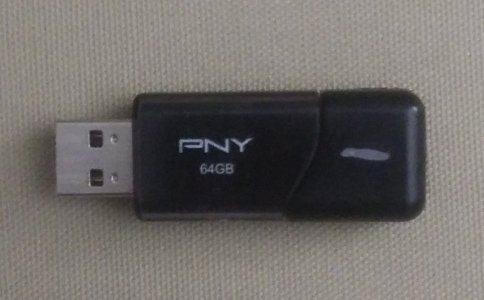
I transfer my photos to a USB Flash Drive.My phone's storage is about half the storage. I'm going to delete some unused pictures. I checked on the battery and turned off battery optimal. Thank you. I haven't gone to my apps to see if anything is better.
It is a small item that connects to your computer.
You copy the photos from your phone via usb to the Flash Drive.
That way you can keep your photos even if you delete them from your phone.
It is like storage. I will take a pic of mine for you.
Be back with the photo.
Oldeagle66
Senior Member
I found email a good place to store things. Photos, movies, forms etc. I just make a folder for them. I have tons of stuff and they won't get lost if any devices get wiped out.My phone's storage is about half the storage. I'm going to delete some unused pictures. I checked on the battery and turned off battery optimal. Thank you. I haven't gone to my apps to see if anything is better.
MarciKS
Dust Bunny Whisperer
@Naturally
I have all but 6 of my apps on deep sleep and it doesn't cause mine to act up. Only when they need updating or the cache is full.
I have all but 6 of my apps on deep sleep and it doesn't cause mine to act up. Only when they need updating or the cache is full.