Beyond Cookies - How To Stop The Invisible Browser Fingerprint That Tracks You Everywhere

In recent times I've enabled a VPN and an ad-block in Firefox extensions because of the stepped up marketing intrusions from all quarters. I shall also do the "resistFingerprinting" configuration in Firefox, as mentioned in the article.
EDiT
This morning I received a Dear Google User email about "updates to our partner ads setting control".

"At Google, we believe you should always be in control of your data. That's why we've built My Ad Center and many Google Account tools, like Privacy Checkup, that make it easy to manage your data, privacy, and security settings."

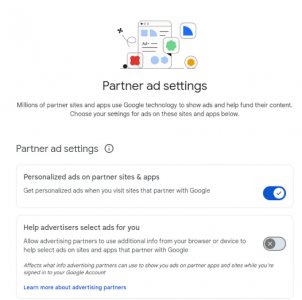
Well, even though you can disallow advertising partners to use additional info from your browser or device to help select ads on sites and apps that partner with Google, a user still can't turn off getting personalized ads when you visit sites that partner with Google..I guess the little slider selector was just for looks:

Screenshot at 2026-04-24 09-17-22.jpg
shrug.gif
 
Last edited:
In recent times I've enabled a VPN and an ad-block in Firefox extensions because of the stepped up marketing intrusions from all quarters. I shall also do the "resistFingerprinting" configuration in Firefox, as mentioned in the article.
EDiT
This morning I received a Dear Google User email about "updates to our partner ads setting control".

"At Google, we believe you should always be in control of your data. That's why we've built My Ad Center and many Google Account tools, like Privacy Checkup, that make it easy to manage your data, privacy, and security settings."

Well, even though you can disallow advertising partners to use additional info from your browser or device to help select ads on sites and apps that partner with Google, a user still can't turn off getting personalized ads when you visit sites that partner with Google..I guess the little slider selector was just for looks:

View attachment 499972
View attachment 499973

Yeah, Google is the true dark side. I don't have anything to do with them.

If you haven't already loaded it, "No Scrip" is a great blocker program. What is it? - NoScript - consensual browsing! And it's free. When you go to a website, it lists all the nefarious players that will have access to your computer and browsing habits. You can block them all, although some websites won't let you look at them unless you unblock them. They want to be sure to be able to track, categorize and spam you. Some websites will not let you look at them with a VPN.

I used to use Tor a lot, but all the protections slow down browsing functionality a little.
 
In recent times I've enabled a VPN and an ad-block in Firefox extensions because of the stepped up marketing intrusions from all quarters. I shall also do the "resistFingerprinting" configuration in Firefox, as mentioned in the article.
EDiT
This morning I received a Dear Google User email about "updates to our partner ads setting control".

"At Google, we believe you should always be in control of your data. That's why we've built My Ad Center and many Google Account tools, like Privacy Checkup, that make it easy to manage your data, privacy, and security settings."

Well, even though you can disallow advertising partners to use additional info from your browser or device to help select ads on sites and apps that partner with Google, a user still can't turn off getting personalized ads when you visit sites that partner with Google..I guess the little slider selector was just for looks:

View attachment 499972
View attachment 499973

I received the same e-mail from Google.
I saw the e-mail in my notifier, I deleted it!

Just delete it, don't need it! :LOL:

I have all the gagets and apps that are supposed to protect you online.
There really is no such thing as privacy anymore but it never hurts to try.

🤗
 
Some websites will not let you look at them with a VPN.
I was using a VPN and it gobbled data. My provider didn't throttle me, but there are some providers that might.

Another issue about the VPN: When I surfed without it, I got CAPTCHAS with every search, followed by more CAPTCHAS. I finally stopped using the VPN and over time (I'm guessing - at least 4 weeks) - I finally stopped getting CAPTCHAS.
 
Changing your IP with a VPN doesn't help much anymore, with the advanced tracking abilities they use these days they can still tell it's you. UBlock Origin has some anti-tracker capabilities built in. It's not just for blocking ads. Also I use the Canvas Blocker extension (in Firefox) which continuously changes your fingerprint and fakes some things which makes it harder to fingerprint you. I know it works because every time I log onto my wife's Facebook account it says hey we have never seen this device before, here solve this captcha so we can make sure it's you.
 
changing this setting if Firefox will seriously slow things down:

Flip one powerful Firefox setting Type about:config in the address bar → search for privacy.resistFingerprinting → set it to true. This standardizes canvas, timezone, fonts, and other outputs so you blend in with everyone else. Takes 30 seconds and makes a measurable difference.
 
Back
Top