If you have an iPad (or other tablet), what are your favorite apps to use ?

Happyflowerlady

Vagabond Flowerchild
Location
Northern Alabama
One of the things that I really like about an iPad over a regular computer, is using apps for all sorts of things, from playing music, to drawing pictures, editing photos, and even watching movies and checking the weather.
I even have some self-help "tapes" (well , that is what we used to call them) on apps, and I can use my headphones and listen when I go to sleep at night.
My fitness tracker has an app; so I can see how far I walked, and how well I slept. The CarbMnager app helps me track what I am eating. I don't play online games; but many people enjoy doing that, and tablets usually have a great variety of gaming apps, too.

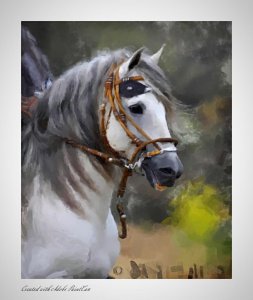
Here is an example of a painting app, and it is called "Paint Can".
What it does, it turn any photo that you have on your computer into a painting , and it is fun and easy to do. You have several presets, that determine whether the lines will be sharp or blurred, and just by running your fingers over the picture, you can paint it.
Here is a quick example of how easy it is to change a photo into a painting.
IMG_0797.jpg
 

Attachments

  • IMG_0785.JPG
    IMG_0785.JPG
    105 KB · Views: 53
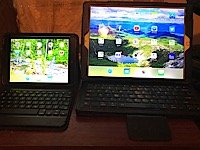
I just got a new (to me) iPad Mini 2nd generation. I found it on Craigslist used; but in like new condition, and a seller that was negotiable. It came with a Zagg keyboard case as well, and the ipad has always been in the case and protected, so it is still like new.
I love my large (almost 13") iPad Pro; but that size, once you add a keyboard cover, is both heavy and bulky, and not good for taking along somewhere.
I have my iPhone, but it is too small and hard for me to read and see what I am doing. So, the Mini is in between, and has all of the apps on it that I want to be portable.
I sometimes listen to self-improvement apps at night, and the Mini is the perfect size for that, too, and just for putting on headphones and listening to music.
I took off some of the apps that I won't need from the phone and the iPad Pro, because they are now on the Mini, so the whole thing should be set up for me to use whichever device I need for what I am doing.
For writing on the forum, the big iPad is great, because I can read it better, and the keyboard is larger; so they all have specialties.
Here is a picture of both side by side, so you can see the difference in size.

IMG_817.jpg
 
I bought a refurbished no-name tablet on Amazon for very cheap.
I use it for following recipes off the internet in the kitchen.
For recipes I've already saved onto my computer (been doing that for years) I use google keep; web site on PC, app on tablet.
For easy ones, I take a picture of the computer screen with the tablet. I can zoom and scroll the pic on the tablet.
I've had a few games on the tablet, but none of them have held my interest long.
 
My husband and I both have tablets, and I have this laptop. Rick likes his for watching movies, if something I am not interested in. I use mine mainly for games. There is a Facebook game I like Cross-Stitch World. Allows you to do virtual cross stitch. I do it on my laptop, but there is also an app for Android and Apple. I used to do real cross stitch a lot, but this is simpler for me now.
 
We do not use FaceTime very often either, although my son, Michael, likes to take me on "tours" of his garden and strawberry patch now and then. Otherwise, we all mostly just use iMessage to keep in contact , or we talk on the iPhones when we need to actually speak with each other.
The Kindle app is great for reading books, and I sometimes use that, too; but I have a regular Kindle that I mostly use just for reading books.
 
I don't FaceTime anymore either. I did at first but it just gets crazy with 3 little boys all vying for my attention at once.

On occasions like a Birthday or Christmas we sometimes still do.

I also have an old iPad mini but it's slow and I never use it.

I spend most of my time on forums so my iPad Air is perfect for that.
 
I downloaded the paint app and it's beautiful.

I did a portrait of my daughter in law and sent it to her.

I watched a few videos on how do it but those guys are always too fast demonstrating. Slow down a bit. I want to see what you are doing before you go to the next step. They always seem to in a hurry.
 
Last year, we've replaced both our old Android tablets. We've given up games we didn't like anymore and found some very interesting and funny ones. Just recently, well two days ago, found a new farming one similar to Township but much easier play and loads more fun. It's called FluffyTown
Fluffy Town: Boom Story - Apps on Google Play

Then another one transferred from previous tablet, Farland
Farland: Farm Village - Apps on Google Play

These are regular fun games to past the time during break times.

Hopefully, you might like them as well?
 
Back
Top