My computer's audio output suddenly quit

By choice (to save money) my desktop computer doesn't have built-in speakers. I have a set of speakers for it somewhere around here, but I've just been using headphones for the past 4 or 5 years. Today, while watching a video, the audio quit. A little red X showed up on the speaker icon, and there's no sound.

I switched headphones, checked the connection, went to settings, did a trouble-shoot, and attempted a fix...and nothin'. Except I did get a message that suggests the kaput output could be because I'm running Win 10.

I'm going to go find that set of speakers and plug them in, but I don't expect them to work.

Anyone else? (who's running Windows 10 and doesn't have built-in speakers)

Or does anyone have advice? Like, what else should I check...or try?
 
By choice (to save money) my desktop computer doesn't have built-in speakers. I have a set of speakers for it somewhere around here, but I've just been using headphones for the past 4 or 5 years. Today, while watching a video, the audio quit. A little red X showed up on the speaker icon, and there's no sound.

I switched headphones, checked the connection, went to settings, did a trouble-shoot, and attempted a fix...and nothin'. Except I did get a message that suggests the kaput output could be because I'm running Win 10.

I'm going to go find that set of speakers and plug them in, but I don't expect them to work.

Anyone else? (who's running Windows 10 and doesn't have built-in speakers)

Or does anyone have advice? Like, what else should I check...or try?
Did you hit the 'mute' button by mistake?
 
I'm assuming 1) you're using windows 2) You checked that your headphones are operating properly 3) go to Settings, System, Sound and make sure you have everything there set properly, The first selection is "choose where to play sound." I hope this helps, sound problems can be quite frustrating to track down.
Last suggestion, ask AI to help you track it down. AI has helped me solve quite a few issues.
 
`The only places I ever see red X is if it was muted either on the speakers, the page tab or the video itself. Just click right no it and change it.

Second thing to always try if shut everything down and start it back up. That fixes MANY an issue before messing with more things that may end up messing up even more.

I'm no tech expert but these simple fixes often solve many a thing.

My internet has been kicking out late night lately all of a sudden. I can go to reconnect it and nothing works. Before I go unplugging all and through a lot of heck I just shut my computer down and then turn it back on and amazingly it all is back up and running.

I think some app or browser or something tries to take over, I have no idea what it is but it solves it every time.

But the red X sounds like a mute. If on the page itself, open up that tab where you can see the entire tab and click on it.
 
My PC is 10yo. (happy birthday, buddy)

@jim_slim I did a reboot. X2, just in case.
@Rich I did all that, too. AI basically said I'm f*ct.
@AutumnGal I verified...it isn't on mute.

Thank you a bunch.

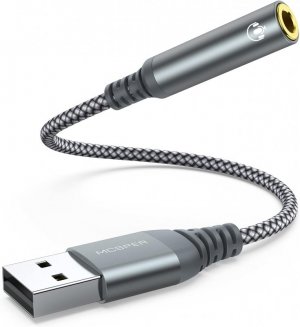
@RambleTamble I did check those out. I'm going to ask my son to order that one for me; the one you're showing. I don't have Prime; he does, and he orders stuff from Amazon fairly often. It'll save me having to pay shipping. Alternatively, he's got a spare laptop. I've got jerky hands and poor eyesight, so I'll have to think about that.

If that converter device isn't the answer, I'm probly going to have to buy a new computer. I really don't want to, but this one won't upgrade to Win 11, and I'm guessing the sound board, circuit, or connector bit on the motherboard, or whatever, is fried, so unless I can replace that, the corporate tech world has me by the balls.

Thanks.
 
Back
Top