The "All Linux" thread

outlander

Member
Location
southern Arizona
I'm curious to see if people are actually interested in Linux stuff. There are already 3 or 4 people that have commented on using it in other threads.

I first tried Linux on an IBM Thinkpad in 2003, I liked it. By 2007 I ditched Windows completely and never looked back. I was a big time gamer or I would have quit Windows sooner. As soon as games required logging in even if playing by yourself against the computer (not online) I was done, no more need for Windows.

Windows XP was the last Microshaft operating system I used, it worked fairly well but it already severely limited what you could modify or change. I used to heavily customize Windows 98 getting rid of Explorer and a bunch of other crap using third party software that worked a lot better.
 
Last edited:
I'm definitely interested in Linux, I plan to use it on my next computer. I have a friend who's also my IT tech and he recommends and uses Linux.
I'll be watching this thread with great interest.
 
I tried it (Linux) using an external hard drive.
I couldn't find a reason to keep using it though.

Anything important is done through Windows. Better web browsers. So once I boot to Windows, I might as well stay there.

Linux is a constant troubleshooting experience. You spend most of the time fixing it and installing updates.

Even Linus Torvalds, creator of Linux, said he doesn't use desktop Linux because he wants something that just works.
 
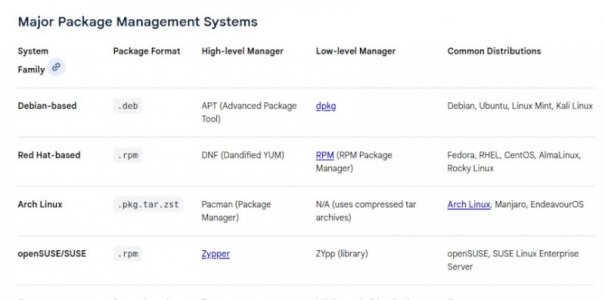
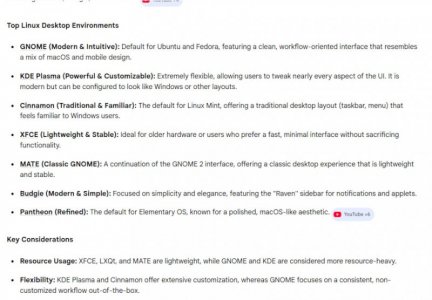
Been with Linux Mint since 2009 and Linux Mint LMDE 7 gigi is my daily driver.
Linux Mint with Cinnamon desktop is quite polished and trouble free when used as a stand alone system right out of the box.
When bored, I play around with all the other operating systems but always run as fast as I can back to Linux.

Pick your "poison":

🐧 Linux Philosophy​

Associated with Richard Stallman and Linus Torvalds.

Core Principles
  1. Freedom First – Run, study, modify, share.
  2. Open Source – Code is visible.
  3. Modularity – Small tools, loosely joined.
  4. User Control – You own the machine.
  5. Transparency – You can see how it works.
  6. Community-Led Development
Mindset
You are the mechanic. The hood is open.
You own the machine. If needed, you rebuild it.
Linux asks: How free should software be?
Linux – A fully stocked workshop. Build and modify freely.

🍎 Apple Philosophy​

Shaped by Steve Jobs and continued under Tim Cook.

Core Principles
  1. Vertical Integration – Hardware + software together.
  2. Simplicity First – Hide complexity.
  3. Control the Ecosystem – Tight platform governance.
  4. Curated Software – Managed distribution via the App Store.
  5. Design as Strategy
  6. Security Through Restriction
Mindset
You are the driver. The engine is sealed.
It should just work. You don’t see the engine.
Apple asks: How seamless should technology feel?
Apple – A beautifully engineered appliance. It just works.

🪟 Microsoft Philosophy​

Historically shaped by Bill Gates and now led by Satya Nadella.

Core Principles (Historically)
  1. Platform Dominance – Get Windows everywhere.
  2. Backward Compatibility – Old software should still run.
  3. Partner Ecosystem – Hardware built by many vendors.
  4. Business First – Enterprise focus.
Core Principles (Modern Era)
  1. Cloud First – Emphasis on Microsoft Azure.
  2. Services Over OS – Microsoft software runs on Linux, macOS, mobile.
  3. Developer-Centric Tools – e.g., Visual Studio Code.
  4. Pragmatic Openness – Embraces open source when useful.
Mindset
You are the office manager. It must work with everything, everywhere.
Meet users where they are. Support everything. Sell at scale.
Microsoft asks: How broadly can we deploy and monetize computing?
Microsoft – A massive industrial toolkit. It must integrate with everything.
 
Firefox, Chrome, Brave, ect. are all available in Linux and work the same as in Windows.

I have 2 laptops, 3 mini pc, and a Raspberry Pi 4 all running various Linux distros. They all function perfectly, remember you have literally hundreds of choices. If things don't work on Windows you basically have one choice. Sometimes certain software, devices, peripherals won't work correctly in Windows. Linux isn't always perfect either, but certainly no worse than Windows.

Windows is not as stable as Unix or Linux, that's why banks, the military, servers, ect. do not use Windows for critical systems.

If I had to constantly troubleshoot Linux I wouldn't bother using it. It's free, stable, more secure, infinitely customizable, and is not actively spying on me ;)
 
... and Linux isn't selling clouds, apps, songs, books, subscriptions, updates or upgrades.

Last week for grins and giggles, I loaded Linux Mint LMDE 7 gigi (the latest LMDE release) onto my Dell Latitude D830 from 2007.
2007 for pete sake and Dell ran with it flawlessly but video struggled on the old Dell.
I loaded and booted the Dell one last time for old times sake and said my goodbyes.
I couldn't have run any other operating system but Linux on my old friend. Well, maybe Windows 7 or XP.
So if you have old hardware and just trying to get a little more life from it, Linux is the answer.

I have a little HP Stream 11" laptop running Linux. It originally came with Windows but is way under powered for Windows.

And I just bought a MacBook Air M4 13" laptop to dip my toes in the Apple waters.
It's a quite impressive engineering marvel of software and hardware integration from the ground up.
The MacBook is engineered so well that even with the most powerful Apple Silicon chip, the laptop is fanless.
Heat isn't a problem and the Macbook doesn't make a sound as it effortlessly flies through everything asked of it.

So, goodbye Dell Latitude D830 (2007). Thanks for ~20yrs of service.

OH ... this message posted from my fanless Mint Box 2 Intel i5 with 16GB ram Desktop with Linux Mint LMDE 7.
I've had this desktop computer since 2018 and it is my daily driver. Many years left in it too.
 
Last edited:
I posted a few days ago about my recent experience with Linux. I installed Mint on an old Toshiba laptop, got my printer working, then set up Thunderbird for email, which initially was fine but then I discovered that Thunderbird on Linux despises VPNs, I had to white list all of my email addresses but it still won't work on Gmail. I also need to Exit and restart Thunderbird often to get to calculate the number of emails in each folder. I installed LibreOffice as a replacement for Microsoft Office. I mentioned that Linux on a 10–12‑year‑old laptop actually runs faster than Windows 11 on my one‑year‑old PC (i7‑14700F, 32 GB RAM).

But after a few days of using it, I’m starting to run into some glitches. I imported an Excel spreadsheet into LibreOffice Calc, and even with help from AI I can’t get the formatting right. Everything is underlined in red as if it’s misspelled, and “Add to Dictionary” only works once before disappearing from the menu. On top of that, the spreadsheet has five or six tabs, but Calc won’t let me copy and paste the additional tabs — it only seems to want to work with the main one.
Edited to add, I'm 100% brand new to Linux so I'm certain with some experience I might be better able to address some of these glitches.
 
Last edited:
I use Claws-mail, Thunderbird has really gotten bloated over the years. Same with LibreOffice, so I use Abiword and Gnumeric for office docs and spread sheets. I've never used actual Microshaft office stuff ever, so I'm not sure of any compatibility issues. Atril for pdf files which I use all the time.
 
Back
Top