Do You Like Your Laptop, What Brand Do You Have?

SeaBreeze

Endlessly Groovin'
Location
USA
Planning to start shopping for my first laptop. I want one so that I don't have to sit in the den to use my desktop, if I want to watch TV in the other room or do something else. I'm not going to get anything fancy, just a Windows system with a decent size screen and a good/safe battery. I don't intend to go beyond Walmart, Best Buy (or Costco). I'm thinking price may be somewhere between $400-$700, not sure.

I don't know much about computers and nothing about laptops. I think RadishRose mentioned here a long time ago that she used a mouse with hers, I'd probably want that option also. I don't like touchscreens, my first experience with them is my smartphone, and I really don't care for it, luckily I just use it for phone calls and not much else.

My desktop now has Windows 10 and is an HP. I don't like Dell, had bad experiences with them in the past, but would probably like another HP or Lenovo, definitely a name brand. I read that the memory should be a minimum of 8GB, not sure if that would be good or not.

So far I've only used the computer to email, visit forums, shop and price things online, search the web for information, and do light surfing around different websites or youtube. I have never watched whole movies, listened to whole concerts or streamed anything on my PC. I doubt that I would in the future. I don't do gaming.

I upload a modest amount of photos from my camera onto my computer, but they would probably still go to my desktop. Other than that, I have no important documents or extensive files saved on the computer to use much memory or data.

I have Comcast broadband with an ethernet connection, and I'm guessing I can just use the laptop without even involving Comcast, as I already have a WIFI modem in my den, I figured anywhere on my main floor would have WIFI reception. I don't know that much about setting up the laptop or how it runs, I assume it needs WIFI signals at all times to function. I guess if the battery is low you can plug it into a wall to recharge, like the phones?

As you can see, I don't know very much and have no geeks around to give me pointers or help out. Figured I'd ask the folks here for recommendations or what to watch out for. You guys have a lot more knowledge and experience with these things than I do.
 

I have a Dell desktop computer with Windows 10. I was thinking of getting a laptop, too, so that I could take it with me to other rooms. Then I decided that I would get a smartphone to do that and do my heavy computer time at the desktop. I am a dinosaur, still do not have a smartphone or even a simple cell phone. Those who help Seabreeze, please comment on my needs. Not meaning to sabotage your thread, SeaBreeze, but it's basically the same need as yours.
 
I have a Dell desktop computer with Windows 10. I was thinking of getting a laptop, too, so that I could take it with me to other rooms. Then I decided that I would get a smartphone to do that and do my heavy computer time at the desktop. I am a dinosaur, still do not have a smartphone or even a simple cell phone. Those who help Seabreeze, please comment on my needs. Not meaning to sabotage your thread, SeaBreeze, but it's basically the same need as yours.

No problem PVC, glad you're sharing your situation and I'm happy to hear all who respond with tech advice. I'm a dinosaur too, wasn't too long about I got my first smartphone after having a Tracfone for years, just for emergencies. I can go online with the phone, but it doesn't suit me, I need a real computer with a keyboard to do anything online.
 
Lenovo. I use a mouse. Bought my first laptop 3 yrs ago, I'm happy with it.
Thanks AC, I'm soured on Dells and I only started owning computers in the year 2000. Good to know you can use a mouse with yours and are happy with it.

My last computer was a Lenovo with Windows 7, and I still have that one in the basement on a dial-up connection. Don't use it really, but good if Comcast goes down and I need to do something on a computer. Now I have the smartphone, but that screen is so small and my eyesight is worsening with age.
 
Last edited:
Most of my computers have been HP and if I'm not mistaken, HP manufactures computers for Dell. My last laptop had to be a 17 inch screen to accommodate my visual challenges. The larger screen laptops can get pretty heavy moving them around but I could take it on the road when my sister had to go to Houston for treatments. My laptop cost me about $1,000 +/- but the larger the monitor, the higher the cost. I purchased a wireless mouse and keyboard to use with it. It was easier on my arthritis to use a regular keyboard than the flatter one on a laptop.
 
As well as my Mac Desktop I have a Toshiba Laptop.. It's got windows on it, I've had it for a long time but it's still in perfect condition...

267521-toshiba-satellite-l745d-s4220rd.jpg
You can use it with only the battery or with it plugged in at all times..or you could simply recharge at the wall when necessary. I find the track pad fiddly to use so I plug in a mouse, it's much easier for me!!
 
My laptop is a Lenovo, used with a mouse and kept on my desk, I also prefer my ipad, with a nine inch screen it's lighter, more portable and great for using elsewhere
 
I have an Acer One 10, which is more tablet than
laptop, there is a clip on keyboard, or it can be just
a tablet.

Unfortunately as the name says it only has a 10" screen,
but it is a Windows 10 machine.

Mike.
 
This summer when I decided to downsize,I really didn't want another computer,mine was a 8 yr old HP Windows 7,the updates took forever to upload,hated it
After doing some research,I bought a HP Chrome laptop at Best Buy end of July,it was on sale.,I paid $270.It took me couple days to adjust to a smaller screen,its 14 inch,and the keyboard
The main reason I bought it was for the size,can still do all the things I did with computer except I no longer have to deal with Windows Sue
 
I have an HP Pavillion laptop that is a couple of years old, it works fine.

IMO the technology is changing so fast you can buy almost anything and it will be fine for the average person.

I'm thinking that the next replacement purchase will be a little tablet of some sort.
 
I'm not sure that the brand matters so much if you stick with a major manufacturer. But do consider the specs. The 8GB of memory sounds good, but really consider the storage. Get a machine with an electronic HDD (called eMMC). Most everything will happen much faster, like page loads and such, making your user experience more pleasant.

My own machine has a 256GB drive and I think that will be sufficient for my needs. I use it as my desktop replacement running Windows 10.
 
Last edited:
HP laptop. I'll never again be trapped at a desk in a certain room.

Buy the wireless mouse separately, about $12.00 at Wally. (Logistics) It comes with a chip. Stick the chip in the side of the lappy. My mouse works great right on the couch, or you can use a book or a magazine.
 
I have a Dell laptop.

I had always had good experiences with Dell so I stuck with them.

But this last one, which crashed and gave me the blue screen of death when I tried to do a system restore has soured me on them.

And on top of that Dell support wanted to charge me about 250 bucks to fix it. 250 bucks to fix a 349 dollar computer that was only 6 months old.

I finally fixed it myself, but only by taking the nuclear option of setting it all the way back to the state it was when it came out of the box. As a result I lost a bunch of stuff.

So Dell has lost me. When this one goes belly up I think I'm going to bite the bullet and spend the money for an Apple.
 
Since getting my first iPad about 5-6 years ago, I have not used anything else, and am totally happy with the iPad for everything that I need to do. It syncs with my iPhone so when I take pictures with the phone, they also go to the iPad. I use an external keyboard with my iPad Pro, making it just about like a 13” laptop, and the iPad can be used without the keyboard when I want to do that.
I have all of the health apps on my phone to monitor my health and fitness, so the phone and iPad just work together perfectly.
If I had to have a laptop for some reason, it would definitely be a MacBook .
 
Toshiba stopped making laptops - they and HP have been my go-to sources. Had a bad experience with a Dell computer as well as their support and swore off that brand.

I've purchased roughly 15 laptops over the years (most for use in our small business) and relatively inexpensive is the way to go, at least in my estimation and experience.

Computers don't generally break because of overuse or being lesser quality, they get glitchy because of outdated operating systems that can't be updated or handle new software, or get damaged from spills, drops, etc.

Being the family techie, I just bought a new laptop for my husband. It was a tall order because he wanted a 17" laptop - most of which are incredibly expensive. We found one here: https://store.hp.com/us/en/Configur...Id=&catEntryId=3074457345618816819&quantity=1

Great price at $349. He's had it for about two months and loves it.

I debated about getting my technically challenged sweetie a Chromebook but after researching I opted against that for two reasons.
First of all, Google is already way up in our business. Why hand them even more information?
Secondly, given equal price points, why buy a severely restricted laptop? Chromebooks are essentially big smart phones good for Internet browsing, various apps, and email only. Why not get something with the flexibility of accepting some additional software? That didn't make sense to me.

Since my eight year old Windows 7 laptop is also getting glitchy and showing its age, I'll be purchasing another of these laptops for me to use when we're traveling. (A desktop is my main workhorse.)

Hope this helps!
 
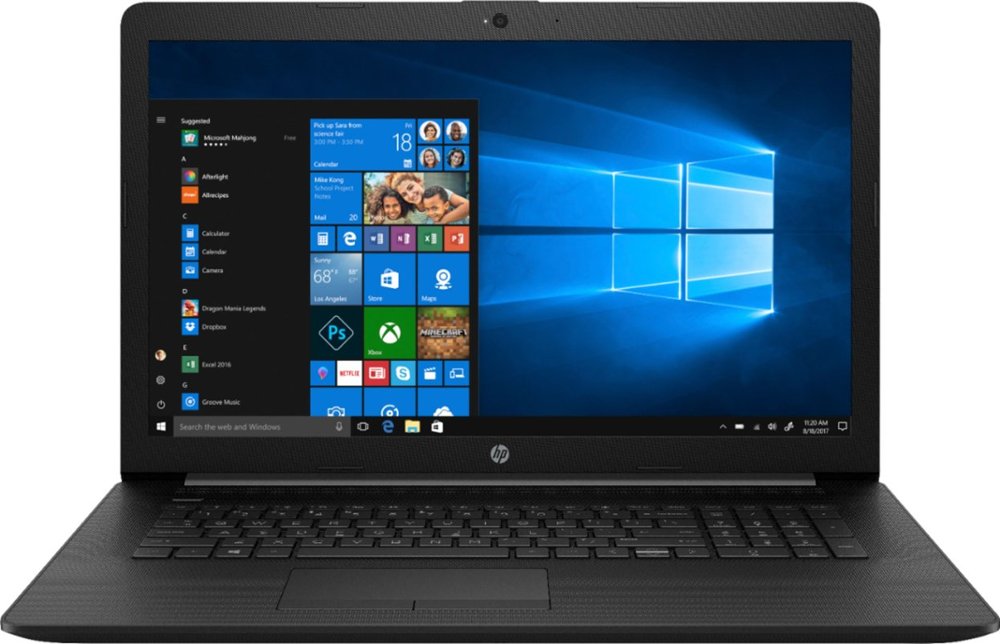
I just bought this 17.3 inch HP at Best Buy on sale for $529.99. I'm going to really try to use the mouse that comes with it, but it does seem so foreign to me. Will buy a regular mouse if I really have to. I like this laptop also because it comes with a DVD disc feature, I'm used to that and it's usually what I use to put photos on for saving.

Thanks again to everyone for sharing your advice and experiences. 🧡


6299804_sd.jpg;maxHeight=1000;maxWidth=1000


Back
Top