

officerripley
Well-known Member
- Location
- Porlock, Calif
IDK; I just now tried it again and got the error message I always get: "Oops! We ran into some problems. The specified URL cannot be embedded as media."Why?

IDK; I just now tried it again and got the error message I always get: "Oops! We ran into some problems. The specified URL cannot be embedded as media."Why?

have you tried just using the insert image next to the smiley face? you can load it off your computer. i can never get the url thing to work.IDK; I just now tried it again and got the error message I always get: "Oops! We ran into some problems. The specified URL cannot be embedded as media."
@officerripley: You seem to be trying to insert an image using the media option instead of the image option. Try the insert image option to upload using a link or attach files to upload from your computer.IDK; I just now tried it again and got the error message I always get: "Oops! We ran into some problems. The specified URL cannot be embedded as media."
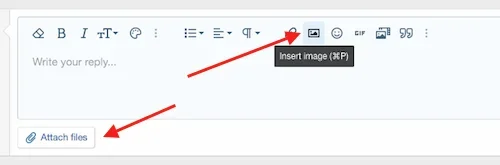


Actually, no, it is gif's I'm trying to insert--I got off topic, sorry--and I always used to be able to insert them before but I guess it's starting about a year ago, I no longer can. Images I haven't had any trouble with since somebody here--don't remember who, sorry--told me about ezgif.com, an online converter that converts to jpeg (and as Matrix pointed out, the site here now takes most png's too).@officerripley: You seem to be trying to insert an image using the media option instead of the image option. Try the insert image option to upload using a link or attach files to upload from your computer.
To better try to help you, how are you trying to insert gif's?Actually, no, it is gif's I'm trying to insert--I got off topic, sorry--and I always used to be able to insert them
I've only ever tried to insert gifs from giphy.com. On that site, I click on the link icon on the gif I want to use and it tells me it's copied to my clipboard; then I come back here to SF and click on the media icon and then insert the media URL which I saved to my clipboard and which always used to work before but starting about a year ago, I get the error msg when I do that. The insert media function here says giphy is one of the approved sites so I don't know what's going on.To better try to help you, how are you trying to insert gif's?
Gifs are not considered media. Try the image icon instead.then I come back here to SF and click on the media icon

Gifs are not considered media. Try the image icon instead.

My pleasure and glad it got sorted out for you.Hey, that worked, *thanks*!


You're not a fan of dancing Snoopys saying Good Morning?I am not a fan of web forums allowing animated gif images even though some people not surprisingly think they are cute/cool and that others will too. No, as has been discussed years ago many of us would ban them. They are often used in annoying ways, especially as unavoidable avatars that are distracting on threads or those that regularly post what they feel are clever humorous videos instead of text.


I use one of two available programs. One is GRANDSON and if the other is GRAND-DAUGHTER.Well, either the program you use works better, or you know what you're doing.. or, most likely, both.
I barely grasped how to use GIMP many years ago, still haven't figured out all of the details.
