When Our Devices Become Obsolete

OneEyedDiva

SF VIP
Location
New Jersey
I'm on my second tablet which I've had for a little less than seven and a half years. Recently, some of the apps I had installed have been deemed incompatible with the operating system, which can no longer be updated, so I had to uninstall them. Three of my banking apps were among them. A couple of apps I tried to install were also incompatible. The first tablet I bought became almost useless after several years and I feel this one is on its way. I'm not one to rush out and buy the newest device, so I'll keep this one as long as I can. My tablet is a Samsung SM-T590.

Have you had devices that could no longer be updated and outlived their usefulness? How long did you wait to replace them?
 
Have you had devices that could no longer be updated and outlived their usefulness?
Not yet. I still have my first computer bought in 2010, which is Windows 7, and still use it as a back up to the Windows 11 laptop I now have. I gave my tablet to a friend since I only want to use a laptop and found no advantage to having both. I don't do contract phones through major carriers. I've only had Tracfone, then Straight Talk. If and when their phones become obsolete, they replace them for me at no charge. That happened a few years ago when 3G was phased out. Tracfone notified me my phone was no longer going to work, and sent me a new one.
 
I usually upgrade when I have no other options... when the device either stops working completely or it becomes too slow.

There's a big pile of non-working electronics sitting in the corner of my garage, waiting to be taken to the electronics recycling place. Maybe some day, I'll finally get around to doing that. I just keep adding to it. And there's all the obsolete and non-working electronics in the basement... several laptops, two PCs, a couple tablets... There are two obsolete Kindles sitting on my desk right in front of me, along with some old calculators. Then there are all the old cables that are of no use any more, such as VGA and S-video cables. There's an old CRT TV in the garage alongside the electronics.

The city has a free electronics drop-off once a year, but it's way up on the north end of town, and I'm in the south suburbs. It would take a good half-an-hour to get there.
 
I'm on my second tablet which I've had for a little less than seven and a half years. Recently, some of the apps I had installed have been deemed incompatible with the operating system, which can no longer be updated, so I had to uninstall them. Three of my banking apps were among them. A couple of apps I tried to install were also incompatible. The first tablet I bought became almost useless after several years and I feel this one is on its way. I'm not one to rush out and buy the newest device, so I'll keep this one as long as I can. My tablet is a Samsung SM-T590.

Have you had devices that could no longer be updated and outlived their usefulness? How long did you wait to replace them?
I looked up the Samsung SM-T590 and it is indeed listed as "generally listed as functionally obsolete." It was released in 2018 which makes it 8 years old. I suppose that's a reasonable run for a device these days. Moreover, you may consider that since security and software updates were discontinued around 2021 or 2022 you're likely safer not using banking apps on that tablet.
To answer your question, Yes. I have a Toshiba Z40 laptop that is at least 10 to 13 years old (the company I used to work for supplied laptops and whenever they upgraded to a new platform they would offer the old models for sale to employees for $100 so I'm not really sure how old it is). It works fine but it's not upgrade-able to Windows 11, and would probably be too slow to be of any use with that software anyway. For those reasons I decided to use it a test system to see how Linux runs. That's been an enjoyable endeavour.
 
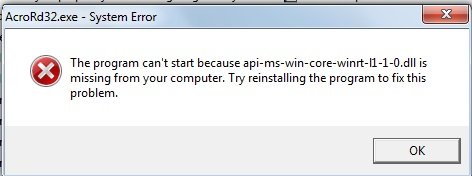
I still have my desktop I bought in January 2012 running Windows 7. It still does what I want it to, for the most part. The past week there was an update to the Adobe Reader program. Every time I booted up, I got this pop-up:

AcroRdr.jpg

I tried to find a solution online, but the advice was confusing and contradictory. Today when I started, I didn't get the message and the pdf documents have the Adobe icon restored. I don't know what happened. 🤔
 
I still have my desktop I bought in January 2012 running Windows 7. It still does what I want it to, for the most part. The past week there was an update to the Adobe Reader program. Every time I booted up, I got this pop-up:

View attachment 489401

I tried to find a solution online, but the advice was confusing and contradictory. Today when I started, I didn't get the message and the pdf documents have the Adobe icon restored. I don't know what happened. 🤔
.dll issues are just another way Windows enjoys teasing us. Sometimes you can search with Google or your favored search engine and find the required .dll and install it. But, it should install automatically with the program or the update.
 
Is it me, or do Apple products have a longer functioning lifespan? Mine is a 2019. The only thing I've had issues with is my 20 year old Pixma printer no longer being compatible. Canon stopped doing updates for the printer a long, long time ago.
 
Is it me, or do Apple products have a longer functioning lifespan?
I used my mom's old iPad after she died, and it became obsolete after a few years (no more updates, the bank app wouldn't work, etc), it seemed like a short lifespan to me, but that's not counting the years she had it.
 
The first iPad I bought
in 2016 is only any use as radio running IOS 9.3.
The second runs IOS 12.5 and is marginally more useful.
This one is much newer and runs everything.
If it reaches a point where it can’t be updated and essential apps do not work it will replaced.
 
Have you had devices that could no longer be updated and outlived their usefulness? How long did you wait to replace them?
Yes. I do not use a smart phone like the rest of the world, but I have a tablet for travel. My 8 year old Samsung had exactly the same issue --- apps not compatible and cannot update operating system. So, I purchased a new one a couple of years ago.
Also had same issue with old desktop pc ---- wouldn't load Windows 11. So bought a new HP which I really did not mind as it has solid state drive and a whole lot of RAM. Runs things in seconds rather than minutes.
 
Huge collection of CD's. My husband loved to buy them. I can still play them, as my old stereo still works, and my car is ancient enough to have a CD player. But when those things kick the bucket, what will happen to all the CD's I can no longer play? I have no idea.
 
I don't know too much about tablets OneEyedDiva,
but if I was in your positions and it is apps that you
really need, then I would try to first, to upgrade the
apps, or add a different operating system into the
tablet, maybe Linux or similar, there are several here
who will gladly help and advise you, about how to
go about the process.

I know that some apps are essential and replacements
are difficult to find.

Mike.
 
Back
Top