Have hearing loss, need to buy better TV. What do others do in this situation?

I have what is probably a very silly question. If I were to get a headset with a wire which I could run under my rug from me to the TV,once I plug the wire into the TV will it cancel out the sound coming from the TV? I ask this because I have a very cheap headset that plugs into the speaker on my computer. As soon as I do that I can only hear through the headset. No sound coming from the computer at all. I use this late at night when I'm on the computer and the hubby is sleeping. With the TV we both need to hear it. We have an old Sony flat screen TV.

Not silly at all Ruth, I am thinking it does cancel out the TV sound, but I believe there is a work-around for that, not at all sure though. Maybe one of the more tekkie guys here can tell us. Also, make sure your TV has a headphone Jack, lots of them don't, like mine. Maybe a wireless speaker like the link that one of the guys sent?? I'll have to find it again. But they are both reading here now, so we can let them answer if they will, thanks much guys;)
 

i have the same problem completely deaf in 1 ear and loosing the hearing in the other ear---i more or less just lip read what i watch on tv
 
These wireless speakers look like a good idea...you can easily move them around as needed. The only drawback, as Camper said, is that you will need to insure that you have good replacement batteries on hand.

Our Panasonic Plasma is one of the few TV's with front mounted speakers, so the sound is good for most applications. However, I like rock concerts, so I installed a Sherwood Home Theater system...with a couple of good externals, and a subwoofer. I can rattle the walls with this rig, but we live in the boondocks, so all I do is irritate the squirrels.

LOL, oh those were the days! Irritating squirrels;) I'll wait and see what you think of the sound system I have (wired) and the whether or not I'd be better off with a "no name" brand like the one at Walmart Don? New, I'm betting my Altec cost way more, but not sure, can't find it online, even a used with a price it's so old now;)
 

My fairly high quality external speaker system has settings to level the volume and to emphasis speech. The sound is excellent out the speakers themselves and those two setting help as well. So does turning on Closed Caption so that the audio is written along the bottom of the screen.

What have you got DP? I'd like to compare/see options so I can make a fairly educated choice, with all of the people here helping me;)
 
Here's a site that offers some suggestions for external speakers. It's really a pretty easy fix, and needn't cost much....the only problem is stringing some cable where it won't get in the way.

https://www.cnet.com/news/a-cheap-and-easy-fix-for-crummy-hdtv-speakers/

I like this set Don! I'm going to price these too, as I don't really need a "surround" system, just a couple would be fine, one on each side, and I don't need that sub-woofer. Sorry I missed seeing this link til now! I'm going to look these up now;) thank you much! denise

PS I can't figure the name of the two in the pic on that link Don? The Cheap and Easy ones, LOL!!
 
i have the same problem completely deaf in 1 ear and loosing the hearing in the other ear---i more or less just lip read what i watch on tv

I'm so sorry Dollie, I may be there one day myself. When I hear someone that has total hearing loss, it sure makes my issue feel real puny:(
 
Have you had your hearing tested?? I bet your problem is not the TV.

Do you mean me Lon? Dollie had posted as well. Just checking. Yes, I was tested a year ago, and although I don't know the numbers, the doc said I had some hearing loss (slight, no need for hearing aids) and the right ear is fine, so far. He said we would test again in a year and see how it is. I do have Tinnitus also, but oddly enough, it doesn't seem to affect my hearing that much, well, maybe more than I realize. Regardless of whether or not it's my hearing or the TV, I think the speakers are going to help me. I don't want headphones, as for one thing, they can make hearing loss worse I've heard.
 
I highly recommend this link that Don posted as it tells about the TVs of today, and there sound (or lack thereof). At least in CNETs opinion, and I agree with the guy at CNET because of mine, and other's experiences with TVs. I've even heard people with no hearing loss talk about it, and many are having to get external speakers. Anyway, it is good info for us because salesman seem to know very little about what they are selling these days. I've been sent home with a number of things that did not work with "my" TV, even though I gave them all the specs on it. Might help someone else here, in finding either a better TV, or at least a sound-system that will work;)

https://www.cnet.com/news/a-cheap-and-easy-fix-for-crummy-hdtv-speakers/
 
This "hitch" might be a problem for me

"No headphone jack? No problem. Most HDTVs have RCA audio-out jacks, and a simple adapter cable will let you plug in your PC speakers. The only hitch is that you may have to venture into the TV's settings and switch the audio to "external."

I don't see that external switch option in my Menu on TV??


I did manage to get a soundbar to work, but it was not going to work for me as far as volume etc. So I'm thinking the speakers connection should work as well, although the soundbar was wired and I was hoping for wireless speakers. I don't know how those work unless they are picking up the wifi from a transmitter that must come with them??

 
I have what is probably a very silly question. If I were to get a headset with a wire which I could run under my rug from me to the TV,once I plug the wire into the TV will it cancel out the sound coming from the TV? I ask this because I have a very cheap headset that plugs into the speaker on my computer. As soon as I do that I can only hear through the headset. No sound coming from the computer at all. I use this late at night when I'm on the computer and the hubby is sleeping. With the TV we both need to hear it. We have an old Sony flat screen TV.

Not a silly question at all. It will depend on your television set. If you have the RCA connections you can connect to that instead of the output jack which cancels out the speaker as soon as you plug the jack in. On my set which is quite old there is no output jack. I hook up to the RCA outlet and the sound still comes out the speakers depending on your volume setting and the earphones because the speaker has not been cut out.

My hookup is exactly like that. Hooked up to the RCA out for sound with RCA cables red,white,yellow on both ends. Ignore the yellow that's video.

Then RCA adapter to plug into from the T.V. that goes to the output. With cable there is only a single outlet. You plug your earphones into that single outlet.

If I hit the mute button on my remote the sound still comes out to the earphone. If I adjust the volume instead I get the speakers and the earphone.

You will need RCA cables from the T.V. and the adapter cord long enough to reach where you are sitting. I have no idea where you can buy them but I'm thinking Best Buy.

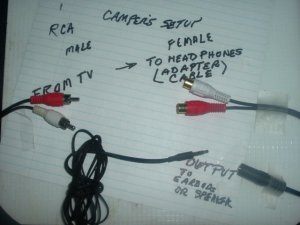
Sending a diagram.speaker.jpg
 
Last edited:
This "hitch" might be a problem for me

"No headphone jack? No problem. Most HDTVs have RCA audio-out jacks, and a simple adapter cable will let you plug in your PC speakers. The only hitch is that you may have to venture into the TV's settings and switch the audio to "external."

I don't see that external switch option in my Menu on TV??


I did manage to get a soundbar to work, but it was not going to work for me as far as volume etc.So I'm thinking the speakers connection should work as well, although the soundbar was wired and I was hoping for wireless speakers. I don't know how those work unless they are picking up the wifi from a transmitter that must come with them??


The external switch to regulate the stereo output is on your cable remote if you are on cable. Otherwise I think it will still work.

There are all kinds of options. For instance you can get external speakers with an earphone jack on the speaker. Sound is still coming out with the earphone plugged in.
 
The external switch to regulate the stereo output is on your cable remote if you are on cable. Otherwise I think it will still work.

There are all kinds of options. For instance you can get external speakers with an earphone jack on the speaker. Sound is still coming out with the earphone plugged in.

Now there's a good option so both people can listen according to their needs!! Right now I am battling with the Quantum Firefox I updated, another topic, later;)

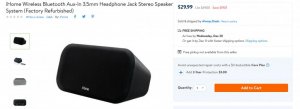
I am going down to pick up these speakers Don, and try them out. If they don't work, or don't put out the sound I need, then I will look for a sound system that has a headphone jack in the speaker;) Below are the ones I'm going to try:

Well, just saw this one, although have to order this, and I first want to try something "in-store stocked" before I order anything I have to wait for in case it's not going to work. But the one below is in stock, so I'll get that and try it out, no headphone jack, but won't matter for testing purposes, and I might like it enough just to keep it;) 15 day return policy, feedback welcome. I have to get ready to go down to the store;) denise PS pics are in the wrong order Don, sorry, it's the first I'm going to pick up today at the store.

bluetooth.PNG
refurbished.jpg
 
Not a silly question at all. It will depend on your television set. If you have the RCA connections you can connect to that instead of the output jack which cancels out the speaker as soon as you plug the jack in. On my set which is quite old there is no output jack. I hook up to the RCA outlet and the sound still comes out the speakers depending on your volume setting and the earphones because the speaker has not been cut out.

My hookup is exactly like that. Hooked up to the RCA out for sound with RCA cables red,white,yellow on both ends. Ignore the yellow that's video.

Then RCA adapter to plug into from the T.V. that goes to the output. With cable there is only a single outlet. You plug your earphones into that single outlet.

If I hit the mute button on my remote the sound still comes out to the earphone. If I adjust the volume instead I get the speakers and the earphone.

You will need RCA cables from the T.V. and the adapter cord long enough to reach where you are sitting. I have no idea where you can buy them but I'm thinking Best Buy.

Sending a diagram.View attachment 45690
Thank you Camper. I am saving your instructions for right after the holidays. This is not the time to look for things with all the crazy shoppers running around.
 
Here is "another hitch" that will have to be considered on a sound system for a TV. It was mentioned to me before, but I couldn't remember what it was called. My TV has Surround Sound option in the Menu, and I don't believe it has this PCM they are talking about. I hope someone else might be helped by all the information gathered here. To put it mildly, TV's of today are crummy for sound, whether you are have hearing loss or not:

View attachment 45694
 
One more thing and I'll get outa here and see what I can find at Walmart, our only store in town, except Ace Hardware has an electronics department, much higher priced though.

Here is a site I used to get almost any manual I need. I have most of my hardcopies, but if someone need one, this is a good site:

http://www.manuallib.com/
 
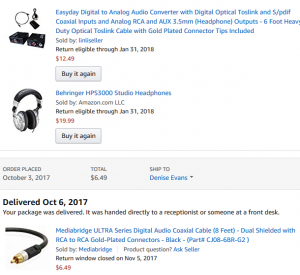
Solved: Thanks to the help of everyone here, I have figured out a way that works for now. I had to go with headphones, or I decided to do that anyway:) With my TV I just use some things I had before. I'm going to list them, and the cost for anyone that has a similar TV setup. Mine has not headphone jack, and Digital Audio Out only. So I had to use a converter (I'll show in list)and an RCA Coaxial cable. Then I just have inexpensive "wired" headphones with one added cord to get them to reach from my chair to TV;) If you are going to do what I did, I can give you step by step how to connect everything. I'll reinsert this photo to show you all I needed to adapt the headphones to my TV;) Hope this helps someone else.

If and when I decide to do something else, I will probably buy a nice set of Bluetooth speakers as I really don't like the feel of headphones. This is going to get me at least, through the Christmas season of movies, and although the headphones don't have a volume control, I just use the TVs remote, works fine;)

PS the only thing I don't have a pic of is the extra cord but is was very inexpensive, below 5.00 for sure;)

parts.PNG
 
Here's another setup I have in my bedroom. This one is from the headphone jack to powered speakers (inexpensive, the same kind you use on your computer) All you need is an extension cord from the jack on the t.v. to the powered speakers. (male to female). Plug one end into the jack on the t.v., the other end (black) into the speakers (the green receptacle).

Because they are powered with a volume control, you can adjust the volume to the level you need.

Now also notice on the speaker is a headphone jack as well. If you plug in a headphone, the speakers cut out. So therefore if you want to watch t.v. at night without disturbing anyone use the headphone. If you want to have the speakers during the day, just pull the headphone out and adjust the volume.

Incidentally, the volume can be adjusted at the speaker or from the t.v. remote.

This would work fine with someone who has the headphone jack on their television set. My t.v. also has the RCA outputs also but I just didn't bother with it.

This is a very inexpensive setup. audio.jpg

I guess the idea for those hard of hearing is to have the sound come out closer to your ears instead of from a distance.
 
Camper this is all great information and thank you so much for all of it because I feel my setup right now is only going to be temporary at best I would much rather have speakers sitting on either side of me and yes I agree if the sound is closer to us especially those with hearing loss then it will be beneficial I'm hoping that a lot of folks that are suffering by not being able to hear the sound from these crummy TV speakers can get some ideas here I don't think we talked about anything that is very expensive at all of course I do understand if you have zero money to spend then you can't buy anything but luckily I have a little bit I can spend and I have found a solution for now so thank you again to everybody that helped out with this thread and I'm all for keeping it going because I think there might be a lot more people out there that would enjoy finding out some different ways that they can hear their televisions movies TV shows much better thanks again talk to you later Denise
 
Okay nobody follow my directions I decided to try a channel I mean a movie and my DVD player and the headphones work but there's no volume control I assume the television remote was going to control the volume but it doesn't you have to turn well you don't have to turn the volume off on the television but there is no volume control on these headphones so I'm dead in the water once again very discouraged going to give up for today I do have an extra pair of headphones that are Wireless that I bought today for $20 because they were Wireless but I could not get those to work at all today I read the directions I don't understand them so maybe I'll try working on them tomorrow night everyone
 
Thanks. All I have provided is my own experience and the solution . I'm quite happy with what I have. I worked it all out on my own.

Let us us know how those Bluetooth work out. I have no experience at all with Bluetooth.

Wireless doesn't work without a transmitter.
 
I think my wireless I bought today have a transmitter everything's in there that you need according to the gal that sold them to me but maybe you know why when I plug my regular wired headphones and I can hear through them but the sound is still on on my television so I turned that off and I still get sound through my headphones but I can't control the volume because I've turned off the television speakers I am really confused because if the sound still coming from the TV then it should still be controlled by the remote but yet I did turn the volume off on my television speakers but they're still coming through the headphones
 
Maybe I should send you some Maalox because if there's a sure way of getting indigestion, it's trying to make heads or tails of my descriptions of what is happening :sosad:


Back
Top