Have hearing loss, need to buy better TV. What do others do in this situation?

I wonder if I need to change the HDMI 1 (the one I have my DVD Player plugged into) to Analog instead of Digital? I "am" using that Digital to Analog converter?? I'm so tired of trying things, but I'll try that and see if it allows me to control the volume (when I am using the headphones) with the TV Remote.

PS No, that didn't work, turned off all volume. Nothing through headphones, or when unplugged, nothing from TV. Nevermind:( arggggg!
 

Maybe I should send you some Maalox because if there's a sure way of getting indigestion, it's trying to make heads or tails of my descriptions of what is happening :sosad:

O.K. If you are using the digital outputs on the back of your t.v. that does not turn the speakers off and you should be able to control the output of the volume through your t.v. Think of it this way. Your t.v. is outputting the sound from the RCA digital output source.

Next. Where does it go. Wired, directly to your earphones or powered speakers. Again the volume controlled by your t.v. Even if you use the mute button sound will still come out at the preset volume level.

Now go wireless.
Im thinking your wireless transmitter has to be plugged into the digital output. Then it transmits the sound wirelessly to your earphones or wireless speakers.

See I don't know what you have for the wireless transmitter. It can't transmit the t.v. sound without being plugged into the t.v. sound output somewhere along the ine.


Are you following me? And you still should be able to control the volume from the t.v. because the sound is still being outptted from the t.v.

Now you mentioned a DVD. Where is that plugged into and how is it plugged in?

That has to go into the input jack on the t.v.

Then the sound will come out through the output jack .
 
O.K. If you are using the digital outputs on the back of your t.v. that does not turn the speakers off and you should be able to control the output of the volume through your t.v. Think of it this way. Your t.v. is outputting the sound from the RCA digital output source.

Next. Where does it go. Wired, directly to your earphones or powered speakers. Again the volume controlled by your t.v. Even if you use the mute button sound will still come out at the preset volume level.

Now go wireless.
Im thinking your wireless transmitter has to be plugged into the digital output. Then it transmits the sound wirelessly to your earphones or wireless speakers.

See I don't know what you have for the wireless transmitter. It can't transmit the t.v. sound without being plugged into the t.v. sound output somewhere along the ine.


Are you following me? And you still should be able to control the volume from the t.v. because the sound is still being outptted from the t.v.

Now you mentioned a DVD. Where is that plugged into and how is it plugged in?

That has to go into the input jack on the t.v.

Then the sound will come out through the output jack .

I guess I'm too tired now to go back through things, but my coaxial cable is in the Digital Out "hole" and the other end is in the converter. My DVD player is hooked to the TV through an HDMI cord. I appreciate your help, but I best wait on this until tomorrow when I am thinking straight. I admit this has really been a trial for me fixing this darn thing so I can hear my movies.

I'll re-read everything you wrote, and reply in the a.m. ok Camper:) Thanks again, Denise
 

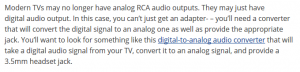
This is the directions I looked at, at least when I purchased the converter (just the same as the blue underlined). What the article doesn't have in it, is anything about controlling the volume. I'm still looking for that. Sometimes I just don't know when to quit so I'm looking up some things for tomorrow. Mine looks like the Converter box in post #23, but it is the same thing as in the quote from the article, just a different brand. Also, I am using the black w/gold coaxial, instead of the other style, Audio Y RCA adapter. The coaxial is an RCA adapter as well, just simpler.

my converter.PNG

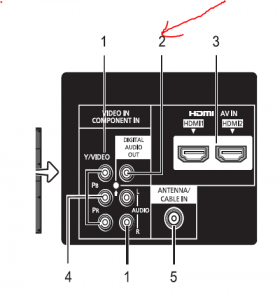
Below is a better pic from the manual for the back panel area of my TV. The #2 hole is where I have my Coaxial plugged in, that is the Digital Audio Out. Then the Coaxial goes in the "coaxial labeled slot" in the converter.

coaxial for digital audio out hole.PNG
 
This is the directions I looked at, at least when I purchased the converter (just the same as the blue underlined). What the article doesn't have in it, is anything about controlling the volume. I'm still looking for that. Sometimes I just don't know when to quit so I'm looking up some things for tomorrow.

View attachment 45714

What does the cord of the transmitter look like that gets plugged into the t.v. somewhere.
 
I added more above Camper. Do you mean the main connecting Coaxial? What is the transmitter, isn't that the converter?
 
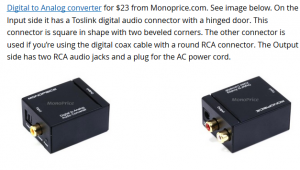
This is what I have, the go between Camper, to convert my Digital Audio to Analog so I can use the headphones, or Soundbar, or speakers etc.

converter.PNG
 
What have you got DP? I'd like to compare/see options so I can make a fairly educated choice, with all of the people here helping me;)
I have an earlier model of this ZVOX model. Mine doesn't have Bluetooth but I think it is basically the same. I got a pair of them for $150 when they were discounting them just before they switched over to models with Bluetooth. I hook it up with a single connector from my TV through their optical digital connectors. It is low profile wooden box that you set your TV on top off. It's dimensions are 28 "W x 14.5"D x 3.5 "H.

https://zvox.com/collections/soundb...440-home-theater-accuvoice-built-in-subwoofer

From that link:

[h=3]CAN'T UNDERSTAND TV DIALOGUE? ACCUVOICE SOLVES THAT![/h] ZVOX's proprietary AccuVoice technology literally lifts voices out of the sound track - and then modifies the voices using hearing aid technology. We have never heard dialogue this clear and sharp. You'll hear every word, even on poorly mixed programs or British programs.CNET says “Great for folks who have trouble hearing the TV.

[h=3]ZVOX TAMES LOUD COMMERCIALS.[/h] If you've ever been blasted out of your chair by a too-loud commercial - you'll love our Output Leveling (OL) feature. Just push the OL button and a sophisticated processor takes over, making soft sounds louder and loud sounds softer, so there are fewer jarring moments when switching channels or when commercials come on.

Now as an old electrical engineer I will point out that those two features do work to some extent and they can be switched ON and OFF. But to do that they do change/distort the audio a bit so there are programs/times I want them OFF and times I want them ON. When I want them ON is when I want to listen to dialog; when I want them OFF is when I want to listen to action movies, usually at a louder volume to appreciate the crashes, bangs, explosions, etc to get the 'home theater' effect.
 
I have an earlier model of this ZVOX model. Mine doesn't have Bluetooth but I think it is basically the same. I got a pair of them for $150 when they were discounting them just before they switched over to models with Bluetooth. I hook it up with a single connector from my TV through their optical digital connectors. It is low profile wooden box that you set your TV on top off. It's dimensions are 28 "W x 14.5"D x 3.5 "H.

https://zvox.com/collections/soundb...440-home-theater-accuvoice-built-in-subwoofer

From that link:

CAN'T UNDERSTAND TV DIALOGUE? ACCUVOICE SOLVES THAT!

ZVOX's proprietary AccuVoice technology literally lifts voices out of the sound track - and then modifies the voices using hearing aid technology. We have never heard dialogue this clear and sharp. You'll hear every word, even on poorly mixed programs or British programs.CNET says “Great for folks who have trouble hearing the TV.

ZVOX TAMES LOUD COMMERCIALS.

If you've ever been blasted out of your chair by a too-loud commercial - you'll love our Output Leveling (OL) feature. Just push the OL button and a sophisticated processor takes over, making soft sounds louder and loud sounds softer, so there are fewer jarring moments when switching channels or when commercials come on.

Now as an old electrical engineer I will point out that those two features do work to some extent and they can be switched ON and OFF. But to do that they do change/distort the audio a bit so there are programs/times I want them OFF and times I want them ON. When I want them ON is when I want to listen to dialog; when I want them OFF is when I want to listen to action movies, usually at a louder volume to appreciate the crashes, bangs, explosions, etc to get the 'home theater' effect.

This looks great dpwspringer,

I think my BIG issue though, is the darn TV with it's Digital Audio out, no analog. So I have to have that converter gadget. I believe it's working correctly now. But I have to figure out why my TV remote won't control the volume when I use the headphones. I'll have to work with it again this a.m. while I'm not so burned out. Lastnight I just was fried from reading and tinkering with it, plugin, try again, and again, LOL! Finally gave it up and watched a TV show on Roku. I can hear them ok, use the captions for backup;)

Really think that system you have is a great price, and would be worth it. If I can solved the volume control issue, then I'll invest in a decent bluetooth "something or other" :)
 
This looks great dpwspringer,

I think my BIG issue though, is the darn TV with it's Digital Audio out, no analog. So I have to have that converter gadget. I believe it's working correctly now. But I have to figure out why my TV remote won't control the volume when I use the headphones. I'll have to work with it again this a.m. while I'm not so burned out. Lastnight I just was fried from reading and tinkering with it, plugin, try again, and again, LOL! Finally gave it up and watched a TV show on Roku. I can hear them ok, use the captions for backup;)

Really think that system you have is a great price, and would be worth it. If I can solved the volume control issue, then I'll invest in a decent bluetooth "something or other" :)

Re volume remote. Are you using the cable remote or the remote that came with the t.v.

I have found out that the cable remote can't always control the volume and you have to use the t.v. remote for that purpose.

So. Do you have a cable remote and a television set remote?

I went to a friends house and programmed the cable remote to match the television set. Now it works. It must be something like that, that is giving you the problem.

I believe the remote that came with the television can control the volume.
 
Re volume remote. Are you using the cable remote or the remote that came with the t.v.

I have found out that the cable remote can't always control the volume and you have to use the t.v. remote for that purpose.

So. Do you have a cable remote and a television set remote?

I went to a friends house and programmed the cable remote to match the television set. Now it works. It must be something like that, that is giving you the problem.

I believe the remote that came with the television can control the volume.

I don't have cable, so although I did use a Universal Remote for a time, I have now been using my TV Remote that came with the set Camper. I read about someone that had a similar setup, so they bought headphones with volume control on them. They still didn't work. It's like the TV stays on the same volume on an external device.
 
I'm literally posted on 3 other forums right now, trying to find just one person that has actually had the same problem. Seems I am "odd woman out" again though:( Sorry to sound so low, but I just can't understand why manufacturer's aren't more into building things for all, different people, especially the "sound/audio" issue. I have a Universal resentment today, LMBO!!

I am so willing to buy a decent "sound system" but I dare not unless I know the volume is NOT going to be an issue. I found some nice Bluetooth Speakers at a very, decent price I'd like to order, but thinking I would have the same dang issue. I'll put a pic of what I want to get.

https://www.walmart.com/search/?query=553744077&cat_id=0
 
Here's the answer I got from Cnet Forums Camper, maybe will help others here as well. It still doesn't tell me if the volume will work on an external device, but I am just going to shop for something with that, and try it. I think this thread might have been better in the "technical" board but admin didn't move it. It is more about "hearing loss" I guess any way you look at it;)

"optical audio is digital and not volume controlled. This is done for reasons too long to get into here but it means that the volume control is done in the audio decoder, headsets or speakers.

-> Since this is how optical audio is supposed to be, there is no reason to solve it.

Now if you want volume control, you have to get that feature in your external devices." from CNET tech forum
 
Denise. I read it and I am amazed at how complicated it is for wireless. I think it's just simpler to use a cable to powered speakers for the average joe. For the technical type they might want to fool around with extra stuff you have to buy.

For me. RCA cables to the digital output. Extension cord to the earphones or powered speakers. Volume control bulit in to the speakers and the t.v.

I can't ask for more. If your t.v. doesn't have analog output? Just forget it is the way I look at it now. All those conversion accessories and for what? Volume control? Doesn't make sense.
 
I totally agree about getting wireless headphones, which would be the best way, but if not, then wireless speakers that you can put right next to where you are sitting.
I can’t remember what it is called, but there is a little adapter that connects the bluetooth headphones or speakers with your television, and once you have one of those, you could use either the headphones or speakers, whichever you prefer.
Wireless headphones are great because you are not tied into having that cord between you and whatever you are listening to.
I looked it up, and it is called a Bluetooth Transmitter, and they are pretty cheap. Here is a webpage that shows you what they are.
https://www.bestbuy.com/site/searchpage.jsp?id=pcat17071&st=Bluetooth+Transmitter

Also, if you look for bluetooth headphones on Amazon, you will see all different kinds.
Some are the regular size headphones, some fit on the head but are really small and lightweight, and then there are earbuds, which actually fit right into your ear, and you do not even know you are wearing them.

Bobby and I like to watch totally different programs, so we both use our iPads and bluetooth headsets, and that way we can both watch what we want and not interfere with each other’s programs. We actually don’t use the television very often, because the iPads are so convenient for both of us, and you can use them anywhere, inside, or out when the weather is nice.

 
Denise. I read it and I am amazed at how complicated it is for wireless. I think it's just simpler to use a cable to powered speakers for the average joe. For the technical type they might want to fool around with extra stuff you have to buy.

For me. RCA cables to the digital output. Extension cord to the earphones or powered speakers. Volume control bulit in to the speakers and the t.v.

I can't ask for more. If your t.v. doesn't have analog output? Just forget it is the way I look at it now. All those conversion accessories and for what? Volume control? Doesn't make sense.

I've learned all I need to know though Camper, so might as well get the wireless speakers. I would have to string a lot of wire from my tv, and the Bluetooth have the technology to control volume. I just can't handle the headphones, and I've found some speakers that I am checking on now to make sure they are fully equipped. That way, one on each side, and nothing in my ear;)
 
I totally agree about getting wireless headphones, which would be the best way, but if not, then wireless speakers that you can put right next to where you are sitting.
I can’t remember what it is called, but there is a little adapter that connects the bluetooth headphones or speakers with your television, and once you have one of those, you could use either the headphones or speakers, whichever you prefer.
Wireless headphones are great because you are not tied into having that cord between you and whatever you are listening to.
I looked it up, and it is called a Bluetooth Transmitter, and they are pretty cheap. Here is a webpage that shows you what they are.
https://www.bestbuy.com/site/searchpage.jsp?id=pcat17071&st=Bluetooth+Transmitter

Also, if you look for bluetooth headphones on Amazon, you will see all different kinds.
Some are the regular size headphones, some fit on the head but are really small and lightweight, and then there are earbuds, which actually fit right into your ear, and you do not even know you are wearing them.

Bobby and I like to watch totally different programs, so we both use our iPads and bluetooth headsets, and that way we can both watch what we want and not interfere with each other’s programs. We actually don’t use the television very often, because the iPads are so convenient for both of us, and you can use them anywhere, inside, or out when the weather is nice.


Right, it's a transmitter as you have to connect that to get the signal to the speakers. I have to make sure that can hook to the converter box I have. It has Toslink, which I guess is going obsolete, but there are other connections, which the RCA Coaxial I think is involved. Still a bit more to learn but I should know soon on that;)
 
For the uneducated and unwashed it's simply to hard wire to the speakers. What the heck. You're not going to move them anyway once they are setup.

Do it. Enjoy it. And then fool around with the Bluetooth.

Do you know why they are called Bluetooth?

Because Harald Bluetooth in about 1009 united the the Swedes.

I haven't come across worst technology in my lifetime.

It's a minefield in a morass.

I went to talk to a techie today at Walmart and he doesn't have a clue either.

In the meantime. With an ancient t.v. set, I am hard of hearing and I have solved the problem.
 
For the uneducated and unwashed it's simply to hard wire to the speakers. What the heck. You're not going to move them anyway once they are setup.

Do it. Enjoy it. And then fool around with the Bluetooth.

Do you know why they are called Bluetooth?

Because Harald Bluetooth in about 1009 united the the Swedes.

I haven't come across worst technology in my lifetime.

It's a minefield in a morass.

I went to talk to a techie today at Walmart and he doesn't have a clue either.

In the meantime. With an ancient t.v. set, I am hard of hearing and I have solved the problem.

With my TV, which I don't remember if you have a headphone jack and/or Digital Audio Out only. There is nothing simple with my TV, it stinks but I can't buy a whole new set so I'm just going to keep looking for work-arounds. I'll re-read what you have and see if I missed something. I do know I could get wired speakers as long as they have the volume control in them, and definitely come with a transmitter, thanks for all your help;)
 
I need to do something about the TV sound, I'll never know why the speakers open to the backside of the chasis.

I have a spare set of PC speakers and was all set to plug them into the TV, but the only audio ports the TV has are for RCA jacks.

Maybe I can find an adaptor...
 
Yes, you'll be in the same boat I am N Brown. You'll need the Digital to Analog Audio converter I believe. You may still run into the volume issue as I posted above. Some info I found out from a so-called geek on these things. A rude geek, but I did learn some from him at least. Once I am set up with speakers, I'll let you know if all is working. Then I'll just need to know your exact type of TV etc. I can't direct anyone, but I can share what works for me if I can just get "the rest of the way there" ;)
 
For the uneducated and unwashed it's simply to hard wire to the speakers. What the heck. You're not going to move them anyway once they are setup.

Do it. Enjoy it. And then fool around with the Bluetooth.

Do you know why they are called Bluetooth?

Because Harald Bluetooth in about 1009 united the the Swedes.

I haven't come across worst technology in my lifetime.

It's a minefield in a morass.

I went to talk to a techie today at Walmart and he doesn't have a clue either.

In the meantime. With an ancient t.v. set, I am hard of hearing and I have solved the problem.

Camper, I just read more on Bluetooth, and you are absolutely right. Bluetooth is wireless but the general consensus is, much poorer sound, than from wired. That makes sense to me now that I realized it's "wifi" and which of my "stuff" works better with wifi, than hardwired/ethernet?? The wired works best, duh, man my head is so thick sometimes, then it dawns on me.

I'm going for wired speakers, hell with bluetooth.
 
I need to do something about the TV sound, I'll never know why the speakers open to the backside of the chasis.

I have a spare set of PC speakers and was all set to plug them into the TV, but the only audio ports the TV has are for RCA jacks.

Maybe I can find an adaptor...

Check my diagram in an earlier post.. You plug the PC speakers into the RCA jacks. That's what I have. They work perfect.


Back
Top